ESP Libraries
ESP Arduino standard SW stack
PlatformIO - Library management
lib_deps =
    bodmer/TFT_eSPI@^1.2.3
    https://github.com/stickbreaker/OneWire.git#v2.3.3-ESP32
Where
1.2.3 - an exact version number. Use only this exact version^1.2.3 - any compatible version (exact version for 1.x.x versions~1.2.3 - any version with the same major and minor versions, and an equal or greater patch version>1.2.3 - any version greater than 1.2.3. >=, <, and <= are also possible>0.1.0,!=0.2.0,<0.3.0 - any version greater than 0.1.0, not equal to 0.2.0 and less than 0.3.0
ISR - interrupt service routines
uint32_t FREQ = 1000; //Hz - desired frequency
const uint8_t TMR0_3 = 3; // 0..3
const uint16_t DIVIDER = (80000000/80); // 1us tick base
const uint64_t alarm_value = DIVIDER / 2 / FREQ /*[Hz]*/; // ISR frequency = 1000 Hz --> ISR change pin state twice per period --> thus divider 2
void IRAM_ATTR timer_isr_callback()
{
digitalWrite( PWM_PIN, !digitalRead(PWM_PIN) );
}
void setup()
{
pinMode( PWM_PIN, OUTPUT );
my_timer = timerBegin( TMR0_3, DIVIDER, true ); // timerBegin( uint8_t num, uint16_t divider, bool countUp )
timerAttachInterrupt( TMR0_3, timer_isr_callback, true ); // timerAttachInterrupt( hw_timer_t *timer, void (*fn)(void), bool edge )
timerAlarmWrite( TMR0_3, alarm_value, true ); // timerAlarmWrite( hw_timer_t *timer, uint64_t alarm_value, bool autoreload )
timerAlarmEnable( TMR0_3 );
}
void loop()
{
unsigned long currMillis = millis();
static unsigned long lastMillis = 0;
if( (currMillis - lastMillis) >= 1000)
{
lastMillis = currMillis;
FREQ += 10; // icrease by 10 Hz
if( FREQ >= 2000 )
FREQ = 1000;
// set new frequency
uint64_t alarm_value = DIVIDER / 2 / FREQ;
timerAlarmWrite( TMR0_3, alarm_value, true ); // timerAlarmWrite( hw_timer_t *timer, uint64_t alarm_value, bool autoreload )
}
}
MUTEX
IRAM_ATTR volatile uint8_t event = 0;
void IRAM_ATTR isr_callback()
{
// critical section
portENTER_CRITICAL( &my_mutex ); //LOCK
event++; // set event
portEXIT_CRITICAL( &my_mutex ); //UNLOCK
}
void setup()
{
pinMode( INTERRUPT_PIN, INPUT_PULLUP);
attachInterrupt( digitalPinToInterrupt(INTERRUPT_PIN), isr_callback, FALLING);
}
void loop
{
// critical section - synchro
portENTER_CRITICAL( &my_mutex ); //LOCK
uint8_t local = event; // read event
if(local)
event--;
portEXIT_CRITICAL( &my_mutex ); //UNLOCK
if(local)
{
// event processing ...
}
}
PWM and Timers
Links
- https://lastminuteengineers.com/esp32-pwm-tutorial/
- https://docs.espressif.com/projects/esp-idf/en/latest/esp32/api-reference/peripherals/ledc.html
PWM Channels
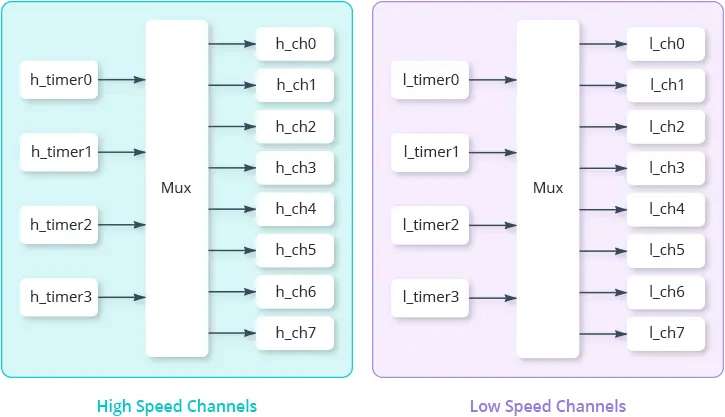
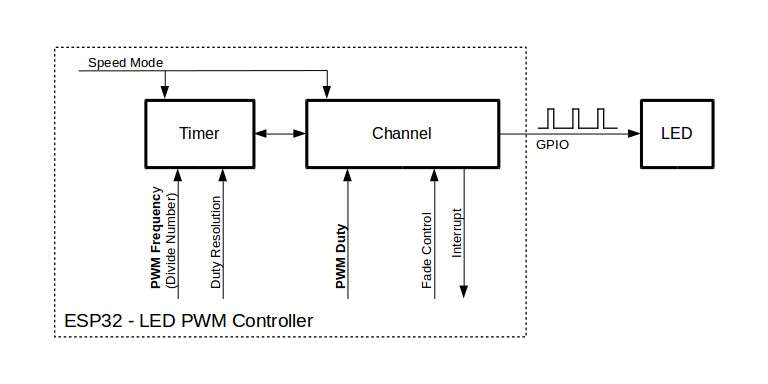
Now let us turn our attention to the concept of a channel. A channel represents a unique PWM output signal.
The ESP32 has 16 channels, which means it can generate 16 unique PWM waveforms. These channels are divided into two groups,
each containing 8 channels: 8 high-speed channels and 8 low-speed channels.
Within each group, there are 4 timers shared among 8 channels, which means that every two channels share the same timer. Since the timer determines the frequency, it’s important to understand that we cannot adjust the frequency of each channel independently within a pair. However, we can control the PWM duty cycle of each channel independently.
The ESP32 can generate a PWM signal with a frequency of up to 40 MHz, and the PWM resolution can be adjusted from 1 to 16 bits. But this doesn’t mean you can set a frequency of 40 MHz and a resolution of 16 bits at the same time. This is due to the fact that the maximum PWM frequency and resolution are both bound by the clock source.
#include "driver/ledc.h"
#include "esp_err.h"
#define TIMER_USED LEDC_TIMER_0 // LEDC_TIMER_0 .. LEDC_TIMER_3
#define RESOLUTION_USED LEDC_TIMER_4_BIT // LEDC_TIMER_1_BIT .. LEDC_TIMER_20_BIT
#define PWM_CHANNEL_USED LEDC_CHANNEL_0 // LEDC_CHANNEL_0 .. LEDC_CHANNEL_7
#define PWM_GPIO_PIN_USED 17
static void IDF_ledc_set_frequency( uint32_t IN_freq_hz )
{
//After that, MAX_DUTY_CYCLE is calculated using the formula 2^PWM_RESOLUTION−1.
//This value determines the maximum achievable duty cycle based on the chosen resolution.
const int MAX_DUTY_CYCLE = (int)(pow(2, RESOLUTION_USED) - 1);
// Prepare and then apply the LEDC PWM timer configuration
ledc_timer_config_t ledc_timer;
memset( &ledc_timer, 0, sizeof(ledc_timer_config_t));
ledc_timer.speed_mode = LEDC_HIGH_SPEED_MODE;
ledc_timer.timer_num = (ledc_timer_t) TIMER_USED; // LEDC_TIMER_0, LEDC_TIMER_1, LEDC_TIMER_2, LEDC_TIMER_3
ledc_timer.duty_resolution = (ledc_timer_bit_t) RESOLUTION_USED; // for (LEDC_TIMER_4_BIT) duty values are 0..15 (8=50/50%)
ledc_timer.freq_hz = IN_freq_hz; // set output frequency
//ledc_timer.clk_cfg = LEDC_APB_CLK; // somehow missing in Arduino framework
ledc_timer_config( &ledc_timer );
// Prepare and then apply the LEDC PWM channel configuration
ledc_channel_config_t ledc_channel;
memset( &ledc_channel, 0, sizeof(ledc_channel_config_t));
ledc_channel.speed_mode = LEDC_HIGH_SPEED_MODE;
ledc_channel.channel = (ledc_channel_t) PWM_CHANNEL_USED; // LEDC_CHANNEL_0 .. LEDC_CHANNEL_7
ledc_channel.timer_sel = (ledc_timer_t) TIMER_USED ; // LEDC_TIMER_0 .. LEDC_TIMER_3
ledc_channel.intr_type = LEDC_INTR_DISABLE;
ledc_channel.gpio_num = PWM_GPIO_PIN_USED;
ledc_channel.duty = MAX_DUTY_CYCLE/2+1; // for (LEDC_TIMER_4_BIT) duty values are 0..15 (8=50/50%)
ledc_channel.hpoint = 0;
ledc_channel_config( &ledc_channel );
}
PSRAM
When PSRAM not detected
- Check if boardXxxx.json contains :
"extra_flags": "-DBOARD_HAS_PSRAM -mfix-esp32-psram-cache-issue" - For deeper digging :
build_flags = -DCORE_DEBUG_LEVEL=5 - then check serial COM output, ex. :
[D][esp32-hal-psram.c:47] psramInit(): PSRAM enabled
        bool psramFound();
        void *ps_malloc(size_t size);
        void *ps_calloc(size_t n, size_t size);
        void *ps_realloc(void *ptr, size_t size);
ESP-NOW
- https://docs.espressif.com/projects/esp-idf/en/latest/esp32/api-reference/network/esp_now.html
- https://randomnerdtutorials.com/esp32-esp-now-wi-fi-web-server/ ... Using ESP-NOW and Wi-Fi Simultaneously
- https://randomnerdtutorials.com/esp-now-esp32-arduino-ide/
- https://github.com/yoursunny/WifiEspNow
DS18B20
- paulstoffregen/OneWire .. newest version 2.3.5 doesnot work for ESP32 due to two cores and bad timing of 1-Wire bus
- https://github.com/stickbreaker/OneWire .. patched vesion
- milesburton/DallasTemperature
Does not work with ESP32
- problem is OneWire library
- See :
https://github.com/espressif/arduino-esp32/issues/1335 .. change timming values in delayMicroseconds(X)
https://github.com/PaulStoffregen/OneWire/issues/57 .. changed library timming for ESP32 - Solutions :
- use older version of paulstoffregen/OneWire @ 2.3.3
- use https://github.com/stickbreaker/OneWire ... A modification of the Arduino OneWire library maintained by @PaulStoffregen. This modifications supports the ESP32 under the Arduino-esp32 Environment.
OTA - Over The Air (firmware update)
YouTube guides
- YouTube - Jan Penninkhof - Over-the-Air (OTA) ESP8266 programming using PlatformIO
- YouTube - Andreas Spiess - #32 Internet of Things with ESP8266 #4: Upload Programs Over the Air (OTA)
- YouTube - Andreas Spiess - #110 Complete OTA with a Reed Switch ?
- YouTube - Andreas Spiess - #157 Simple OTA Software Distribution for ESP8266 (IOTappStory.com)
- YouTube - Andreas Spiess - #225 How-to Manage your ESP32 and ESP8266 over the Air (IOTappstory.com)
- YouTube - Andreas Spiess - #332 ESP32 OTA tutorial with tricks (incl. OTA debugging)
- TelnetStream
- Stream implementation over telnet for OTA debuging
- jandrassy/TelnetStream @ ^1.2.1
- ameer1234567890/TelnetStream2 @ ^1.0.0
- WiFiManager
- WiFi Configuration manager with web configuration portal for ESP boards
- tzapu/WiFiManager @ ^0.16.0
GxEPD - Libraries Comparison
- https://github.com/lewisxhe/GxEPD
- https://github.com/ZinggJM/GxEPD
- https://github.com/Xinyuan-LilyGO/T5-Ink-Screen-Series/ .. (./lib/GxEPD/src/)
| lewisxhe/GxEPD | ZinggJM/GxEPD | lewisxhe/Esp-badge | T5-Ink-Screen-Series | Mnuf. | Inch | Color | Max | WxH | Ctrl | Note |
| GxGDEW0102I4F | YES | YES | GD | 1.02" | b/w | 128 | 80x128 | IL0323 | only can be updated globally | |
| GxGDGDEW0102T4 | GD | 1.02" | 128 | 80x128 | UC8175 | |||||
| GxGDEW0154Z17 | YES | YES | YES | GD | 1.54" | b/w/r | 152 | 152x152 | IL0373 | |
| GxDEPG0097BW | 2.66 | b/w | 184 | 88x184 | SSD1680Z8 | |||||
| GxDEPG0150BN | YES | YES | GD,DKE | 1.54" | b/w | 200 | 200x200 | SSD1681 | ||
| GxGDEP015OC1 | YES | YES | YES | GD | 1.54" | b/w | 200 | 200x200 | IL3829 | |
| GxGDEH0154D67 | YES | YES | YES | GD | 1.54" | b/w | 200 | 200x200 | SSD1681 | replacement for GDEP015OC1 |
| GxGDEW0154Z04 | YES | YES | YES | GD | 1.54" | b/w/r | 200 | 200x200 | IL0376F | |
| GxGDEW0213I5F | YES | YES | YES | GD | 2.13" | b/w | 212 | 104x212 | IL0373 | flexible |
| GxGDEW0213M21 | GD | 2.13" | 212 | 104x212 | UC8151D | |||||
| GxGDEW0213Z16 | YES | YES | YES | GD | 2.13" | b/w/r | 212 | 104x212 | IL0373 | |
| GxDEPG0213BN | YES | YES | GD,DKE | 2.13" | b/w | 250 | 128x250 | SSD1680 | MY LiliGO T5-Eink | |
| GxGDE0213B1 | YES | YES | YES | GD | 2.13" | b/w | 250 | 128x250 | IL3895 | |
| GxGDEH0213B72 | YES | YES | YES | GD | 2.13" | b/w | 250 | 128x250 | IL3897 | replacement for GDE0213B1 |
| GxGDEH0213B73 | YES | YES | YES | GD | 2.13" | b/w | 250 | 128x250 | SSD1675B | new replacement for GDE0213B1, GDEH0213B72 |
| GxGDEM0213B74 | YES | YES | GD | 2.13" | b/w | 250 | 128x250 | SSD1675B | 4-Color/Grayscale not achieved | |
| GxGDE0213B72 | YES | YES | GD | 250 | 128x250 | IL3895 | ||||
| GxGDE0213B72B | YES | YES | GD | 250 | 128x250 | IL3895 | the visible number of display pixels is 122*250, see GDEH0213B1 V3.0 Specification.pdf | |||
| GxGDEW027C44 | YES | YES | YES | GD | 2.7" | b/w/r | 264 | 176x264 | IL91874 | |
| GxGDEW027W3 | YES | YES | YES | GD | 2.7" | b/w | 264 | 176x264 | IL91874 | |
| GxGDEH029A1 | YES | YES | YES | GD | 2.9" | b/w | 296 | 128x296 | IL3820 | |
| GxQYEG0290BN | YES | YES | GD | 2.9" | b/w | 296 | 128x296 | IL3820 | ||
| GxQYEG0290RWS800 | GD | 2.9" | 296 | 128x296 | IL0373 | MY WAVESHARE 2.9" b/w (V2) https://www.waveshare.com/wiki/2.9inch_e-Paper_Module | ||||
| GxGDEW029T5 | YES | YES | YES | GD | 2.9" | b/w | 296 | 128x296 | IL0373 | |
| GxDEPG0290B | YES | YES | DKE | 2.9" | b/w | 296 | 128x296 | IL3829 | MY WAVESHARE 2.9" b/w (V2) | |
| GxGDEM029T94 | GD | b/w | 296 | 128x296 | SSD1681 | MY WAVESHARE 2.9" b/w (V2) | ||||
| GxGDEW026T0 | YES | YES | YES | GD | 2.6" | b/w | 296 | 152x296 | IL0373 | |
| GxDEPG0266BN | YES | YES | DKE | 2.66" | b/w | 296 | 152x296 | SSD1680Z8 | ||
| GxGDEW029Z10 | YES | YES | YES | GD | 2.9" | b/w/r | 296 | 128x296 | IL0373 | MY WAVESHARE 2.9" b/w/r (V3) https://www.waveshare.com/wiki/2.9inch_e-Paper_Module_(B) |
| GxDEPG0290R | YES | YES | DKE | 2.9" | b/w/r | 296 | 128x296 | SSD1680Z8 | MY WAVESHARE 2.9" b/w/r (V3) | |
| GxGDEW042T2 | YES | YES | YES | GD | 4.2" | b/w | 400 | 400x300 | IL0398 | |
| GxGDEW042Z15 | YES | YES | YES | GD | 4.2" | b/w/r | 400 | 400x300 | IL0398 | |
| GxGDEW0371W7 | YES | YES | YES | GD | 3.7" | b/w | 416 | 240x416 | IL0324 | |
| GxGDEW0583T7 | YES | YES | YES | GD | 5.83" | b/w | 600 | 600x448 | IL0371 | |
| GxGDEW075T8 | YES | YES | YES | GD | 7.5" | b/w | 640 | 640x384 | IL0371 | |
| GxGDEW075Z09 | YES | YES | YES | GD | 7.5" | b/w/r | 640 | 640x384 | IL0371 | |
| GxDEPG0750BN | YES | YES | DKE | 7.5" | b/w | 800 | 800x480 | UC8179C | ||
| GxGDEW075T7 | YES | YES | YES | GD | 7.5" | b/w | 800 | 800x480 | GD7965 | |
| GxGDEW075Z08 | YES | YES | YES | GD | 7.5" | b/w/r | 800 | 800x480 | GD7965 |
GxEPD2 - Libraries Comparison
ULP - Ultra Low Power
YouTube guides
- https://www.youtube.com/watch?v=-QIcUTBB7Ww
- https://www.youtube.com/watch?v=n_A_8Y4xNx8
- EXTREME POWER SAVING (0µA) with Microcontroller External Wake Up: Latching Power Circuit
Sleep modes
BootMode
rst cause:2, boot mode:(X,Y)
- rst cause
- 1 – normal boot after power-on
- 2 – reboot by reset button/pin
- 4 – reboot caused by watchdog timer
- X = three low bits of x are {MTDO=GPIO16, GPIO0, GPIO2}
- 1 = uploadFLASH via Serial port {GPIO16,GPIO0,GPIO2} = {0,0,1}
- 3 = running from FLASH {GPIO16,GPIO0,GPIO2} = (0,1,1)
- 5 = boot spi mode from UART
- 7 = boot spi mode from SPI
- Y =
- 7 SDIO HighSpeed V2 IO Uart1 Booting
- 6 SDIO LowSpeed V1 IO Uart1 Booting
- 5 SDIO HighSpeed V1 IO Uart1 Booting
- 4 SDIO LowSpeed V2 IO Uart1 Booting
- 3 FLASH BOOT
- 2 Jump Boot
- 1 UART Boot
- 0 Remapping
DEBUG LEVEL
build_flags = -DCORE_DEBUG_LEVEL=ARDUHAL_LOG_LEVEL_DEBUG
    esp32-hal-log.h :
    #define ARDUHAL_LOG_LEVEL_NONE       (0)
    #define ARDUHAL_LOG_LEVEL_ERROR      (1)
    #define ARDUHAL_LOG_LEVEL_WARN       (2)
    #define ARDUHAL_LOG_LEVEL_INFO       (3)
    #define ARDUHAL_LOG_LEVEL_DEBUG      (4)
    #define ARDUHAL_LOG_LEVEL_VERBOSE    (5)
esptool
- https://github.com/espressif/esptool/
- https://blog.vyoralek.cz/iot/esp8266-a-esp32-zaloha-a-nahrani-noveho-firmware-pomoci-esptool/
- Install esptool :
c:\> pip3 install esptool
c:\> pip3 install esptool --upgrade
Info
- (flash_id) :
c:\TMP\> esptool.py --chip auto -p COM4 -b 115200 flash_id
            Manufacturer: 20
            Device: 4016
            Detected flash size: 4MB
- (read_mac) :
c:\TMP\> esptool.py --chip auto -p COM4 -b 115200 read_mac
MAC: 84:cc:a8:5e:59:c0
- (chip_id) :
c:\TMP\> esptool.py --chip auto -p COM4 -b 115200 chip_id
            Warning: ESP32 has no Chip ID. Reading MAC instead.
            MAC: 84:cc:a8:5e:59:c0
- (read_flash_status) :
c:\TMP\> esptool.py --chip auto -p COM4 -b 115200 read_flash_status
            Enabling default SPI flash mode... (--no-stub)
            Status value: 0x0000
Flashing
- Backup (read_flash) :
c:\TMP\> esptool.py --chip esp32 -p COM4 -b 115200 read_flash 0x00000 0x400000 backup.img - Erase (erase_flash) :
c:\TMP\> esptool.py --chip esp32 -p COM4 -b 115200 erase_flash - Write (write_flash) :
c:\TMP\> esptool.py --chip esp32 -p COM4 -b 115200 write_flash 0x00000 backup.img
PATH of : esptool.py :
- C:\Users\XXXXXXXX\.platformio\packages\framework-arduinoespressif32\tools\ esptool.py
- C:\Users\XXXXXXXX\.platformio\packages\framework-arduinoespressif8266\tools\esptool\ esptool.py
- C:\Users\XXXXXXXX\.platformio\packages\tool-esptoolpy\ esptool.py
               [--chip {auto,esp8266,esp32,esp32s2,esp32s3beta2,esp32s3,esp32c3,esp32c6beta,esp32h2,esp8684}]
               [--port PORT] [-p PORT]
               [--baud BAUD] [-b BAUD]

               [--before {default_reset,usb_reset,no_reset,no_reset_no_sync}]
               [--after {hard_reset,soft_reset,no_reset,no_reset_stub}]
               [--no-stub] [--trace] [--override-vddsdio [{1.8V,1.9V,OFF}]]
               [--connect-attempts CONNECT_ATTEMPTS]

               {load_ram, dump_mem, read_mem, write_mem,
                write_flash, run, image_info, make_image, elf2image,
                read_mac, chip_id, flash_id, read_flash_status, write_flash_status,
                read_flash, verify_flash,
                erase_flash, erase_region, merge_bin, version, get_security_info}
               ...