Embedded /
My ESP boards and resources
ESP32 boards
DATASHEETS
PlatformIO - boards definition
- C:\Users\XXXXX\.platformio\packages\framework-arduinoespressif8266\boards.txt
- C:\Users\XXXXX\.platformio\packages\framework-arduinoespressif32\boards.txt
ESP32 - Boot Mode Selection
- https://github.com/espressif/esptool/wiki/ESP32-Boot-Mode-Selection
- GPIO0 = Low = ROM serial bootloader for esptool.py
- GPIO2 = Low = must also be either left unconnected/floating, or driven Low, in order to enter the serial bootloader. In normal boot mode (GPIO0 high), GPIO2 is ignored.
- GPIO12 (MTDI) = If driven High, flash voltage (VDD_SDIO) is 1.8V not default 3.3V. Has internal pull-down, so unconnected = Low = 3.3V. May prevent flashing and/or booting if 3.3V flash is used and this pin is pulled high, causing the flash to brownout. See the ESP32 datasheet for more details.
- GPIO13 (TCK) = a.k.a. the TCK (JTAG) pin, can be fickle to use. During programing and parts of booting the ESP32 the JTAG pins state should NOT be changed.
- GPIO15 (MTDO) = If driven Low, silences boot messages printed by the ROM bootloader. Has an internal pull-up, so unconnected = High = normal output.
- GPIO34, 35, 36 and 39 ... are input-only pins and cannot be used for outputs - These pins don’t have internal pull-ups or pull-down resistors.
- EN = RST = Reset, active-low
- BOOT = GPIO0 = LOW when pressed
Sequence to force manual boot mode : (press BOOT + press EN + release EN) ==> COM console "waiting for download"
see Embedded.ESPLibraries#boot_mode
Adaptér USB UART CH340 pro ESP-01 (programmer)
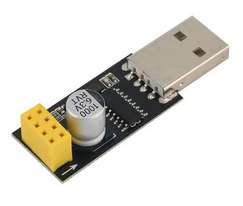
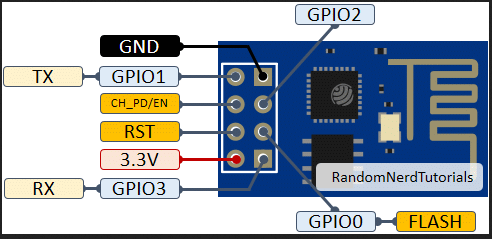
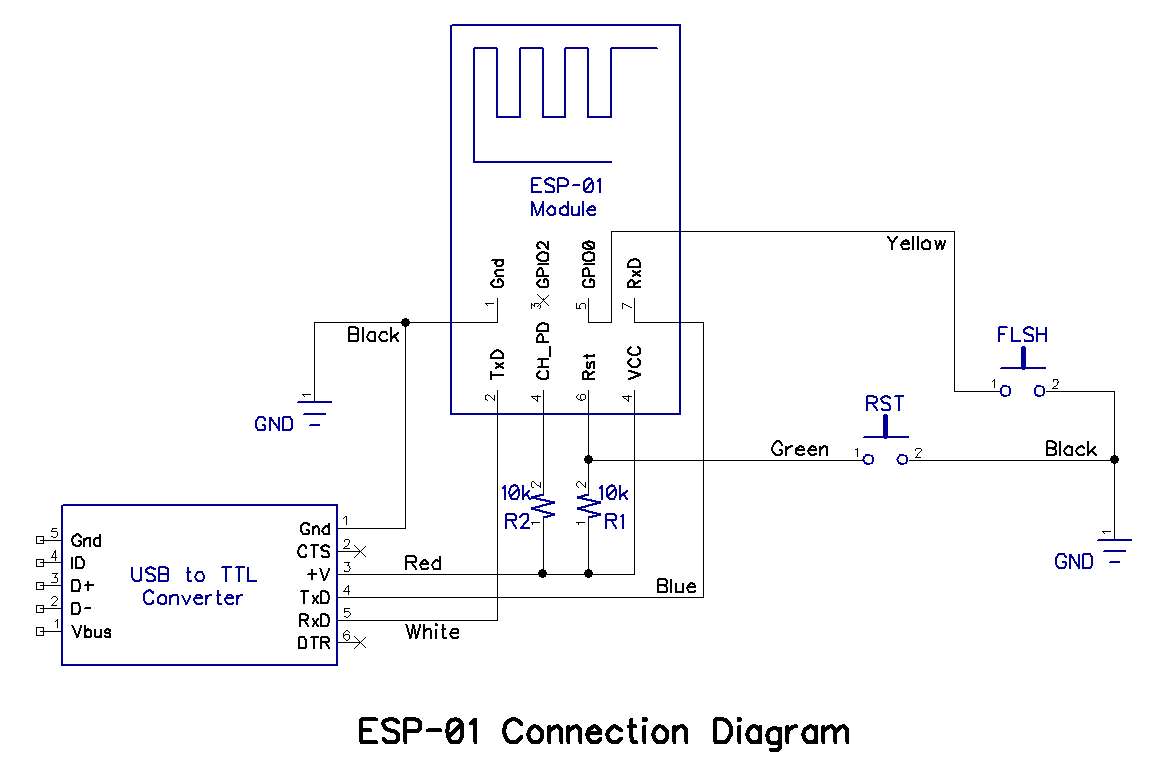
Links:
- https://techfun.sk/produkt/esp8266-serial-wifi-adapter/ .. ESP8266 serial WiFi adaptér (programmer)
- https://www.laskakit.cz/adapter-usb-uart-ch340-pro-esp-01/ ... Adaptér USB UART CH340 pro ESP-01
    -------------------------------------
    ESP-01 CH340    ESP32-CAM
    Programmer      PIN
    PIN
    -------------------------------------
    1 - GPIO3       GPIO3(U0RxD)
    2 - VCC         VCC
    3 -
    4 -
    5 -
    6 - RST                               (additional RESET BUTTON - active low)
    7 - GND         GND
    8 - GPIO1       GPIO1(U0TxD)
ESP32 - Wemos D1 mini
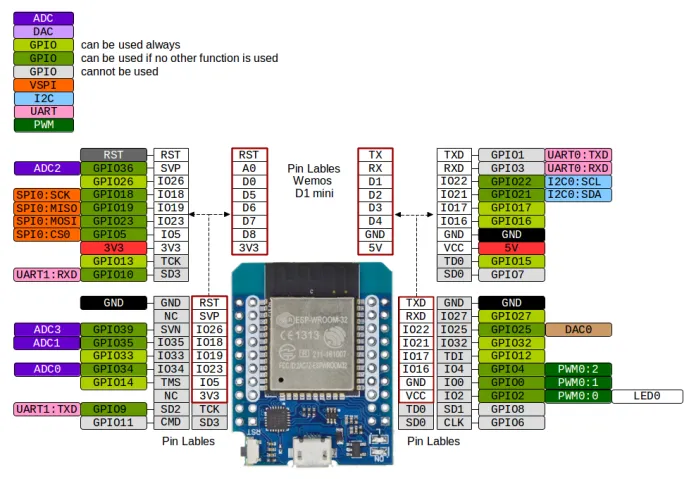
Links:
HW:
- ESP32-D0WDQ6 (revision 1)
- ESP-WROOM-32 (38pin PCB-ANT)
- Fash: 16 MB
- USB DRIVER : CP210x
- GPIO0 = Low = ROM serial bootloader for esptool.py
- GPIO2 = BUILTIN_LED ... must also be either left unconnected/floating, or driven Low, in order to enter the serial bootloader. In normal boot mode (GPIO0 high), GPIO2 is ignored.
- GPIO6 to GPIO11 ... SCS/CMD, namely, are connected to the SPI flash integrated on the module and are not recommended for other uses.
- GPIO12 (MTDI) ... Used for FLASH voltage set. Has internal pull-down, so unconnected = Low = 3.3V.
- GPIO13 (TCK) ... a.k.a. the TCK (JTAG) pin, can be fickle to use. During programing and parts of booting the ESP32 the JTAG pins state should NOT be changed.
- GPIO15 (MTDO) ... If driven Low, silences boot messages printed by the ROM bootloader. Has an internal pull-up, so unconnected = High = normal output.
- GPIO34, 35, 36, 39 ... are input-only pins and cannot be used for outputs - These pins don’t have internal pull-ups or pull-down resistors.
PLATFORMIO :
- https://docs.platformio.org/en/latest/boards/espressif32/wemos_d1_mini32.html
- env:ESP32_WEMOS_D1_MINI
- platform = espressif32
- board = wemos_d1_mini32
- framework = arduino
ESP32 - Wemos D1 mini - SHIELDS
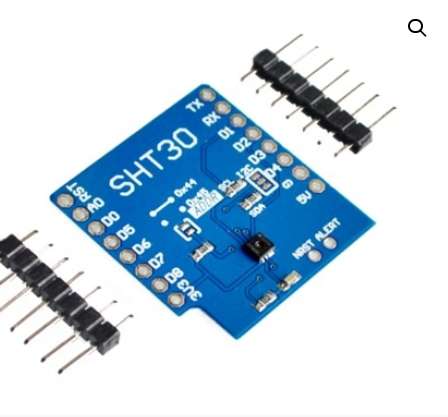
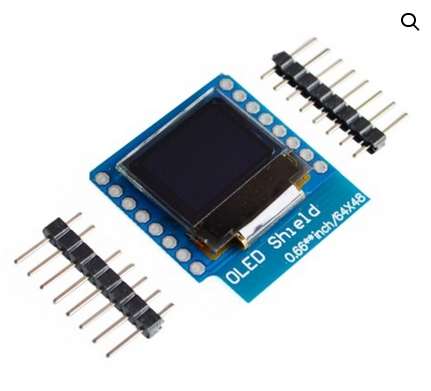
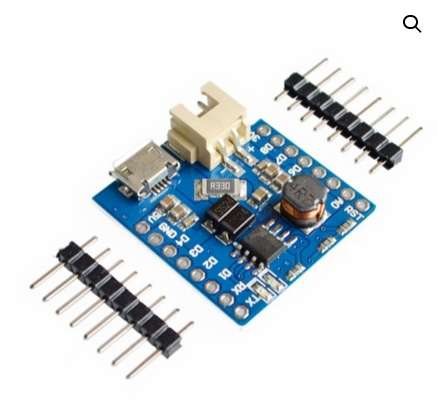
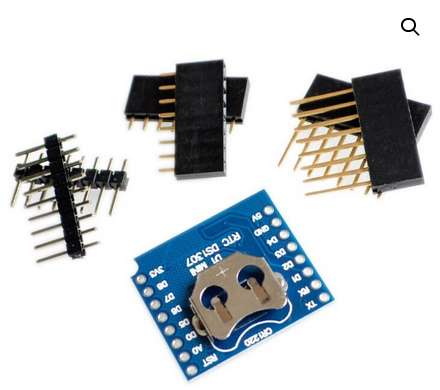
* wemos_d1_mini32_shield-micro-sd-karta.jpg Δ * wemos_d1_mini32_shield-dht22.jpg Δ * wemos_d1_mini32_shield-motor-driver-tb6612.jpg Δ
Links:
- https://techfun.sk/produkt/wemos-mini-senzor-teploty-a-vlhkosti-i2c-sht30-shield/
- sht3x.pdf
- Pracovné napätie: 2.4 – 3.6V
- Typ: SHT30
- Rozlíšenie: 16-bit
- Teplota: -40°C – 125°C, rozlíšenie 0.1°C, presnosť +- 0.3°C
- Vlhkosť: 0-100% RH, rozlíšenie 0.1%, presnosť +-3%
- Rozhranie: I2C adresy 0x45 (default open) alebo 0x44 (short)
- https://techfun.sk/produkt/wemos-mini-oled-0-66-shield/
- Typ: OLED biela farba
- Rozmery: 64 x 48 pixelov, 0.66 palca
- ** Rozhranie: I2C adresy 0x3C alebo 0x3D
- Driver: SSD1306
- https://techfun.sk/produkt/wemos-mini-battery-shield-1a/
- https://techfun.sk/produkt/wemos-mini-shield-rtc-hodinovy-modul-ds1307/
- https://techfun.sk/produkt/wemos-mini-shield-micro-sd-karta/
- https://techfun.sk/produkt/wemos-mini-shield-senzor-teploty-a-vlhkosti-dht22/
- https://techfun.sk/produkt/wemos-mini-shield-motor-driver-tb6612/
ESP32 - TTGO T7
(WEMOS D1-MINI pinheader compatible)
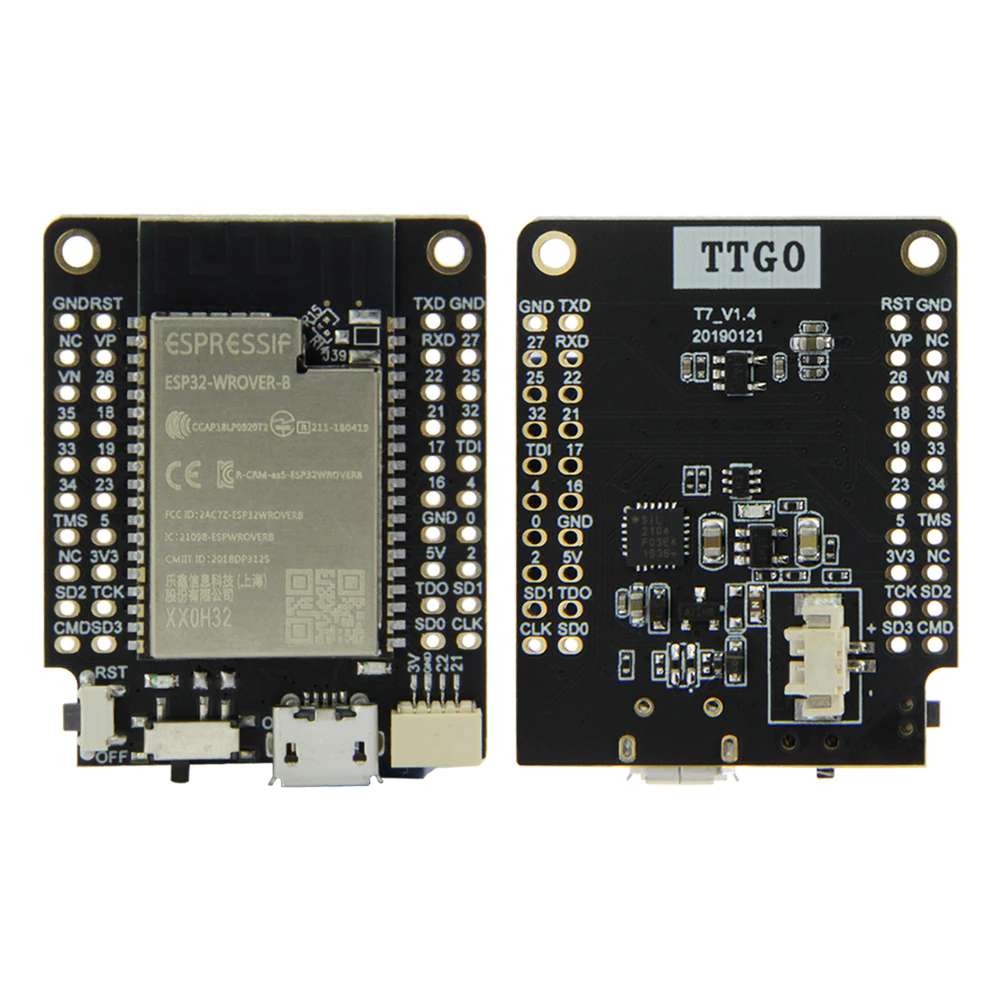
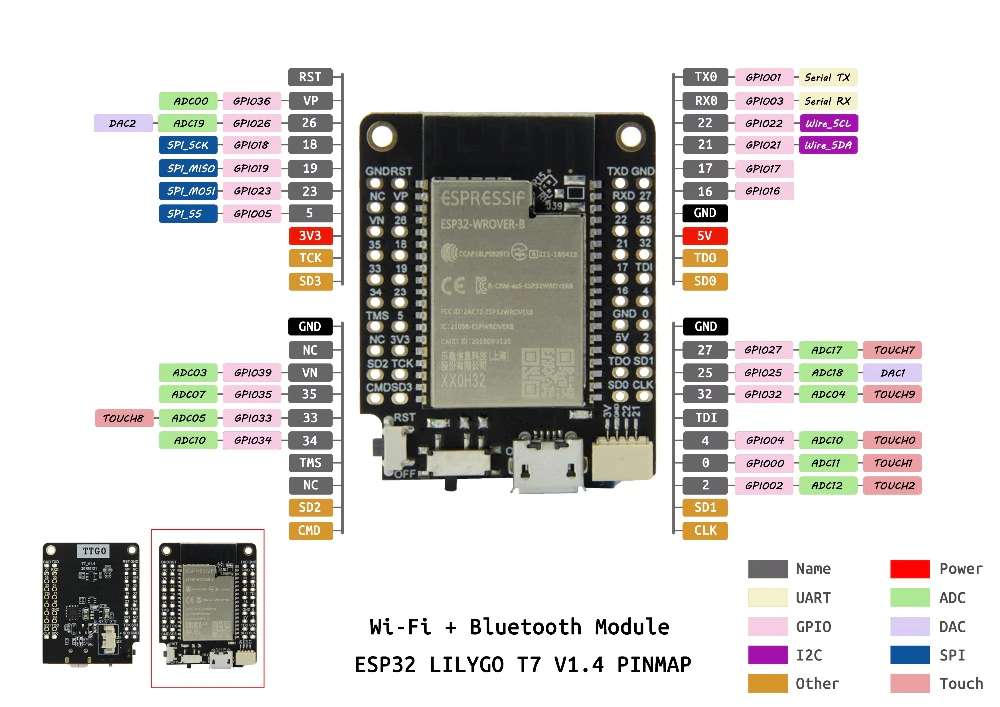
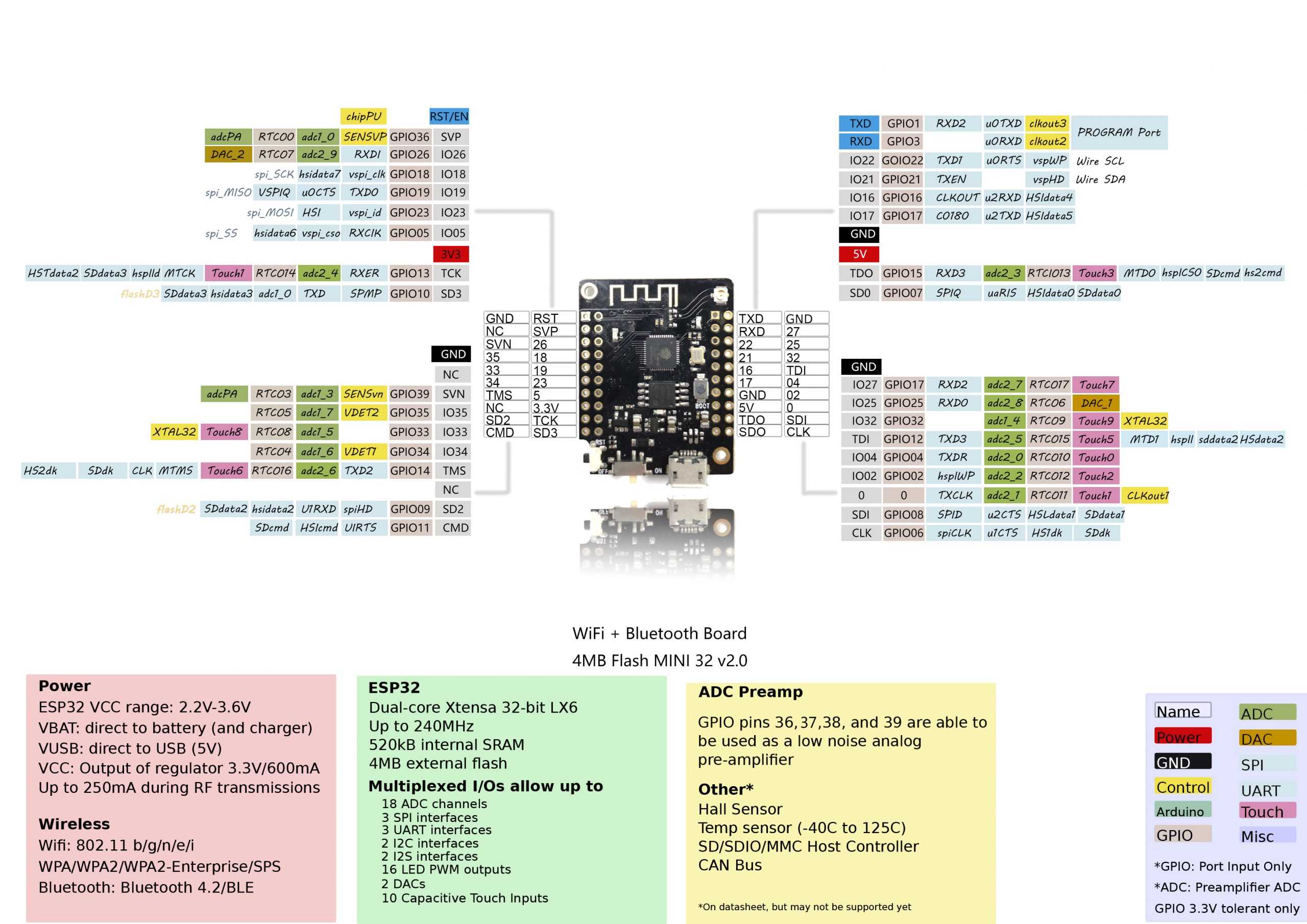
Aliases
- LilyGO TTGO Mini32 ESP32-WROVER-B
- LILIGO TTGO-T7 WIFI a Bluetooth modul ESP32 s 32M FLASH
Links:
- http://www.lilygo.cn/prod_view.aspx?TypeId=50033&Id=978&FId=t3:50033:3 - WROOVER-B version
- https://www.laskakit.cz/lilygo-ttgo-mini32-esp32-wrover-b-wifi-modul/#ratingTab
- https://techfun.sk/produkt/liligo-ttgo-t7-wifi-a-bluetooth-modul-esp32-s-32m-flash/
- https://github.com/LilyGO/TTGO-T7-Demo
- Schemstics : https://github.com/LilyGO/TTGO-T7-Demo/blob/master/t7_v1.5.pdf
HW:
| ESP32-WROVER-B | BARE-BONE |
| laskarduino - 22 Eur | techfun - 10 Eur |
| QSPI flash 4MB / PSRAM 8MB | ??? |
| I2C 4pin connector | n/a |
| INT/EXT antena | INT/EXT antena |
| RESET button | RESET button |
| n/a | BOOT button |
| ON=OFF switch | ON=OFF switch |
| 2P power connector JST-SH-2P | 2P power connector JST-SH-2P |
| RED LED power | |
| LED_BUILTIN=19=GREEN | LED_BUILTIN=19=GREEN |
| USB Micro - CP2104 | USB Micro - CN340C |
PLATFORMIO :
- https://docs.platformio.org/en/stable/boards/espressif32/ttgo-t7-v13-mini32.html
- https://docs.platformio.org/en/stable/boards/espressif32/ttgo-t7-v14-mini32.html - WROOVER-B version
- lib_deps =
- platform = espressif32
- board = ttgo-t7-v14-mini32 .. but this not include PSRAM defines :
build_flags = -DBOARD_HAS_PSRAM -mfix-esp32-psram-cache-issue - upload_speed = 921600
ESP32 - LOLIN32
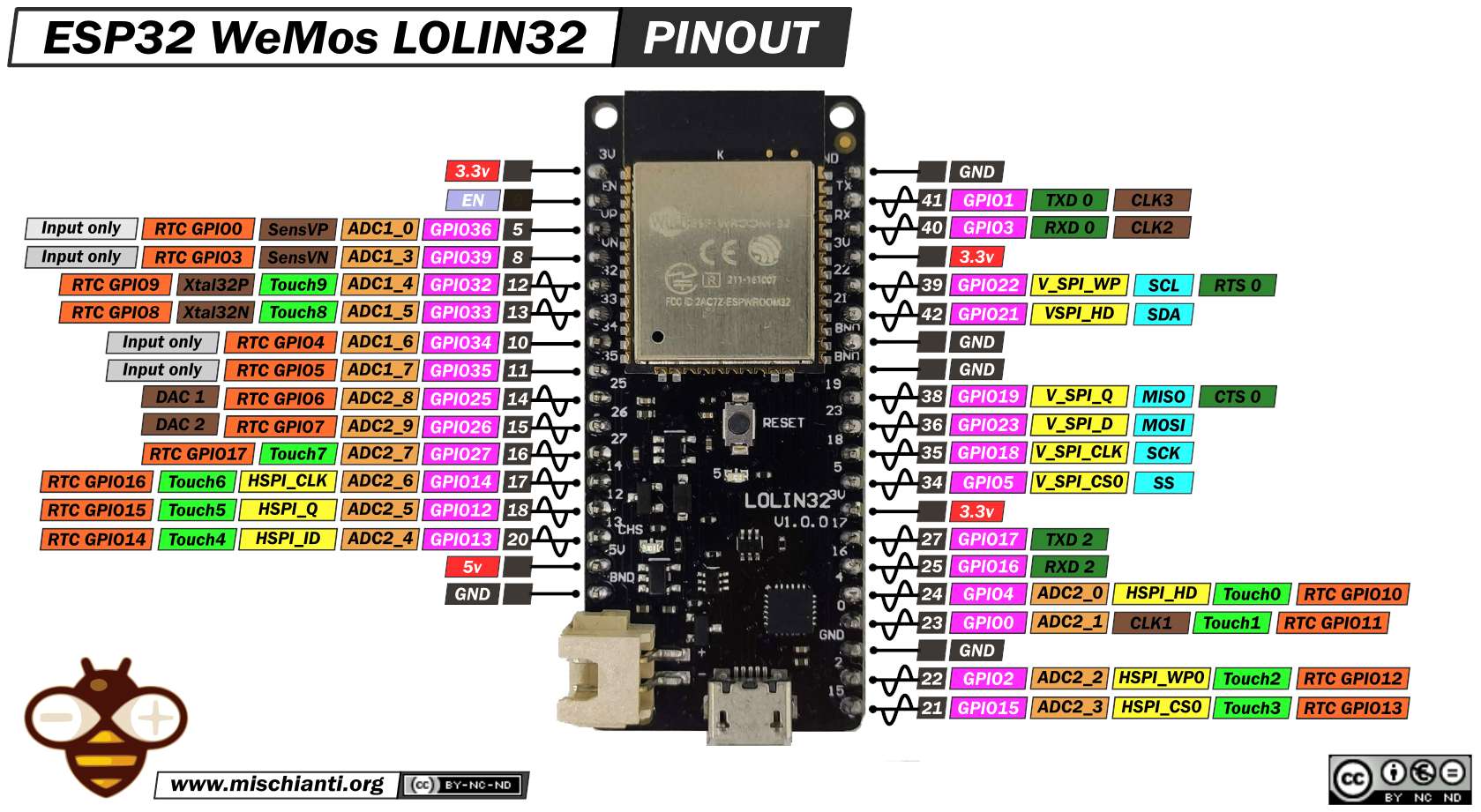
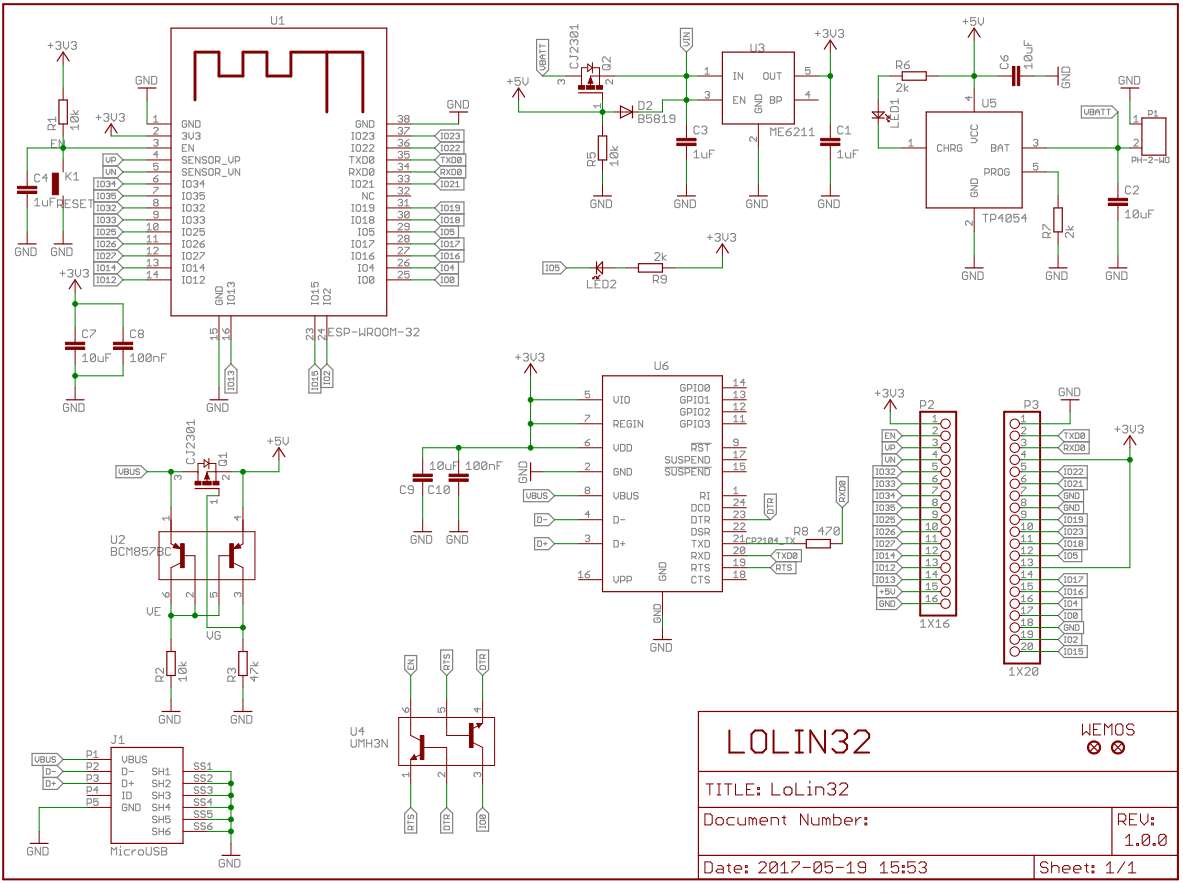
Links:
- https://techfun.sk/produkt/wemos-lolin32-lite-esp32-4mb-wifibluetooth-s-bateriovym-konektorom/
- https://www.laskakit.cz/lolin-32-esp-32s-2-4ghz-dual-mode-wifi-bluetooth--cp2102--nabijeni-baterie/
HW:
- ESP-WROOM-32 (38pin PCB-ANT)
- RAM: 320 KB
- Fash: 4 MB
- LED_BUILTIN = BUILTIN_LED = GPIO5 (BLUE active low)
- USB DRIVER : CP210x
- O nabíjení LiPol se stará TP4054, max nabíjení 500mA, JST-PH-2 konektor ... asi nema over discharge ochranu ???
PLATFORMIO :
- https://docs.platformio.org/en/latest/boards/espressif32/lolin32.html
- platform = espressif32
- board = lolin32
ESP32 - LilyGO TTGO T-Display 1.14″ ESP32 +TFT displej
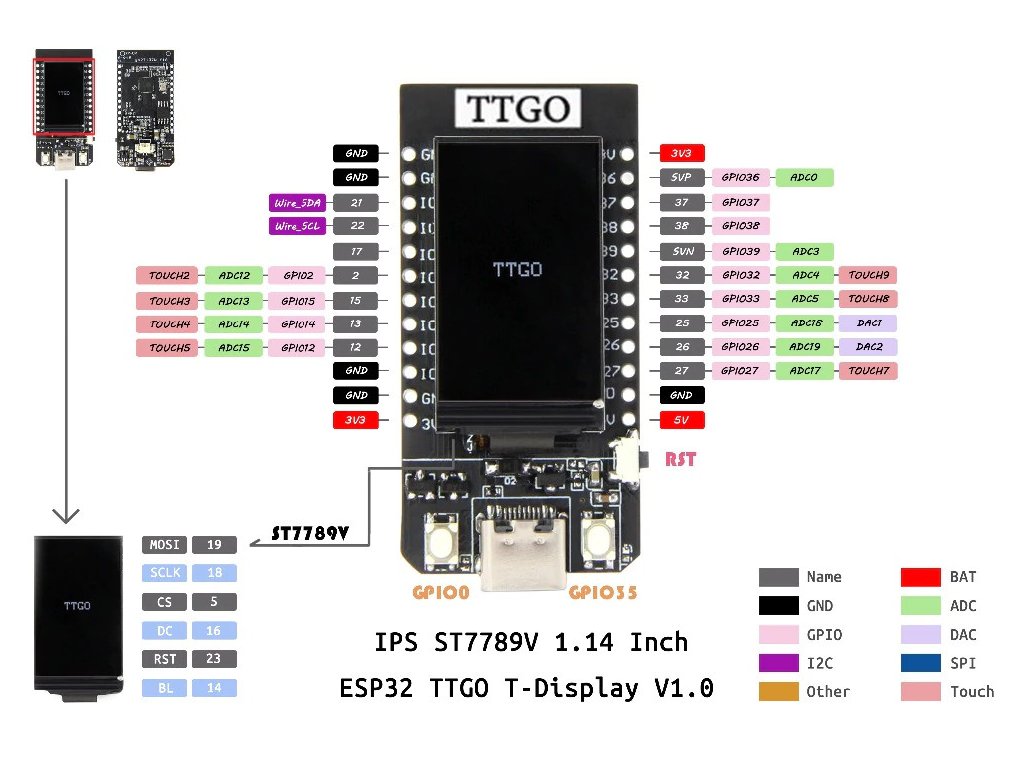
Aliases:
- TTGO LoRa32-OLED-V1
Links:
- https://techfun.sk/produkt/lilygo-ttgo-t-display-1-14-esp32-tft-displej/
- https://github.com/Xinyuan-LilyGO/TTGO-T-Display .. original builtin firmware
- https://github.com/JakubAndrysek/TTGO_T_Display ... TFT_eSPI library patch
- Youtube - Getting started with ESP32 development using the TTGO T-DISPLAY
- https://randomnerdtutorials.com/esp32-built-in-oled-ssd1306/
- https://github.com/platformio/platform-espressif32/issues/209
HW:
- soldered chip
- QSPI flash 4MB
- BUILTIN_LED = NONE (blue LED is chager unit TP4054 an its not connected to GPIOx)
- USB DRIVER : CP210x
- Display : IPS ST7789V 1.14 Inch
PLATFORMIO :
- https://docs.platformio.org/en/latest/boards/espressif32/ttgo-t1.html
- https://docs.platformio.org/en/latest/boards/espressif32/ttgo-lora32-v1.html .. MAYBE ???
- platform = espressif32
- board = ttgo-t1 / ttgo-lora32-v1
- framework = arduino
GCC
- '-D' 'ARDUINO_M5Stick_C'
- '-D' 'ARDUINO_VARIANT="m5stick_c"'
- '-D' 'ARDUINO_BOARD="M5Stick-C"'
ESP32 - M5 Stick
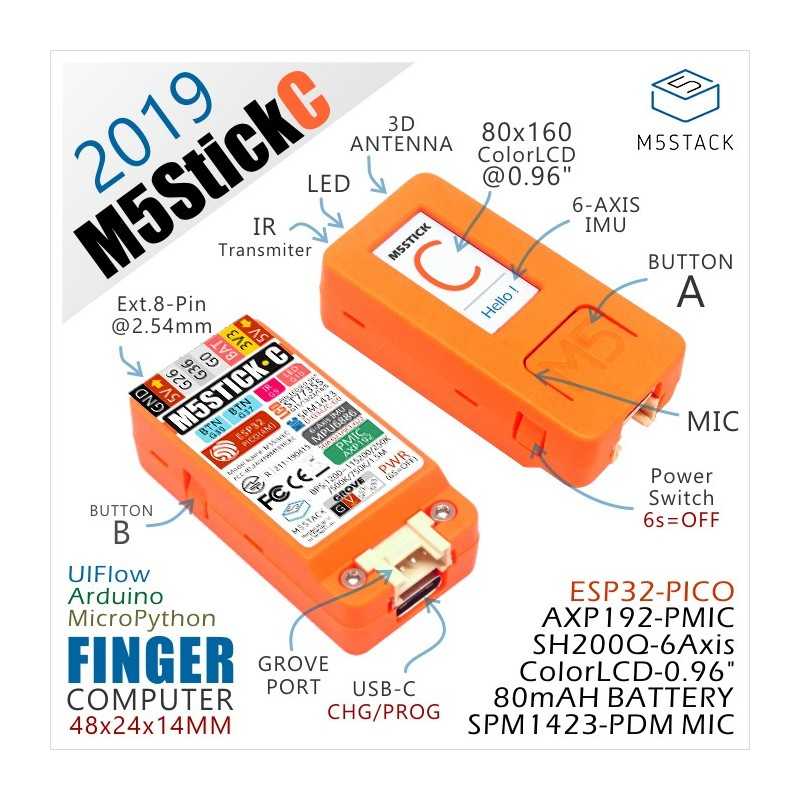
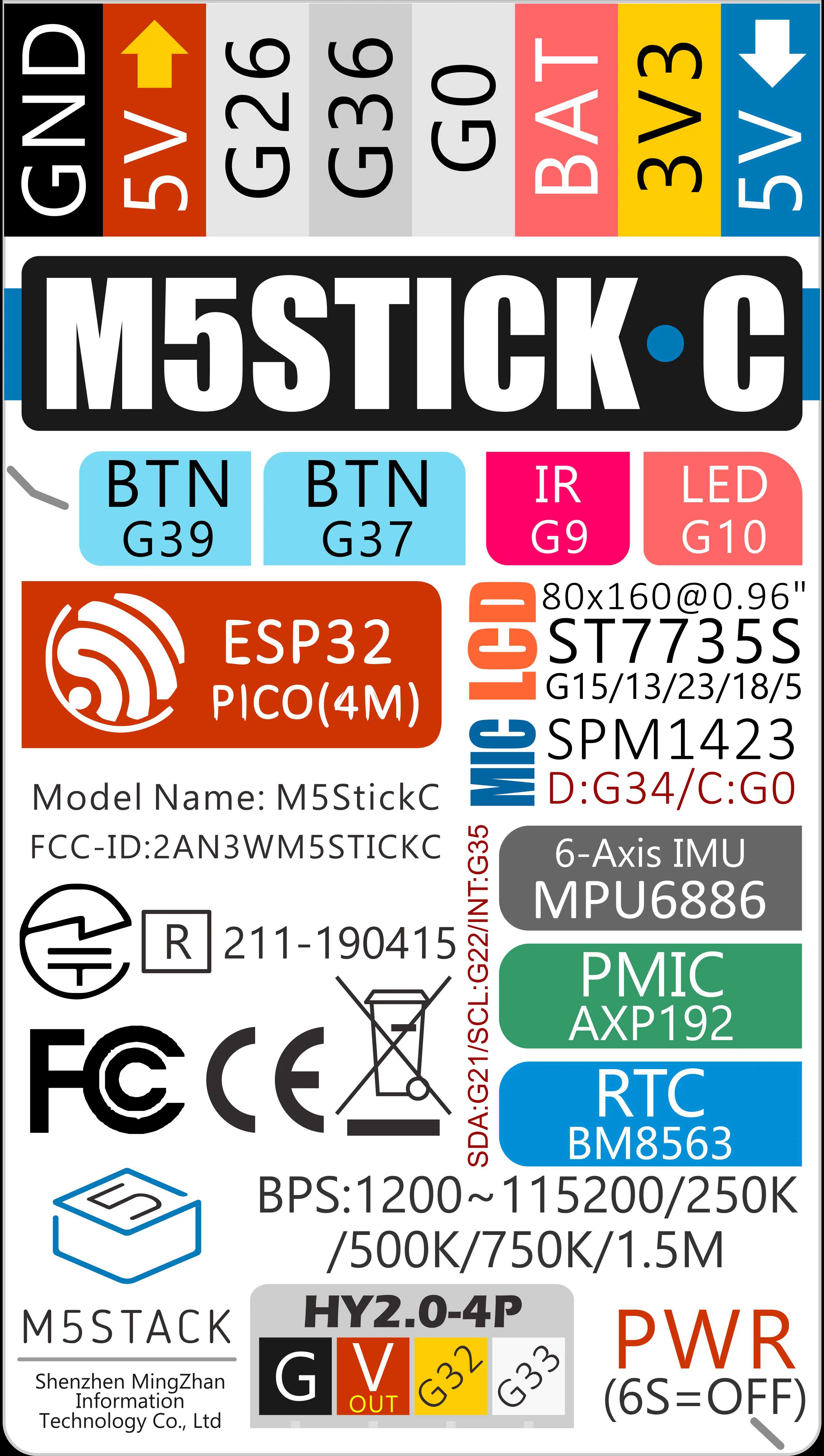
Links:
- https://rpishop.cz/m5stack/4175-m5stickc-plus-esp32-pico-mini-iot-vyvojovy-kit.html
- https://rlx.sk/sk/accessories-ipod/7284-m5stickc-esp32-pico-mini-iot-development-board-m5-k016-c.html
- https://registry.platformio.org/libraries/m5stack/M5StickC
- https://github.com/m5stack/M5StickC .. EXAMPLES
- https://docs.m5stack.com/en/core/m5stickc .. PinMap + Schematics
Switching machine operation:
- Press for two seconds to turn it on, and press and hold for six seconds to turn it off.
HW:
- ESP32-PICO-D4 (revision 1)
- ESP32-WROOM-32 (38pin PCB-ANT)
- 4 MByte Flash + 520K RAM
- USB DRIVER : FTDI
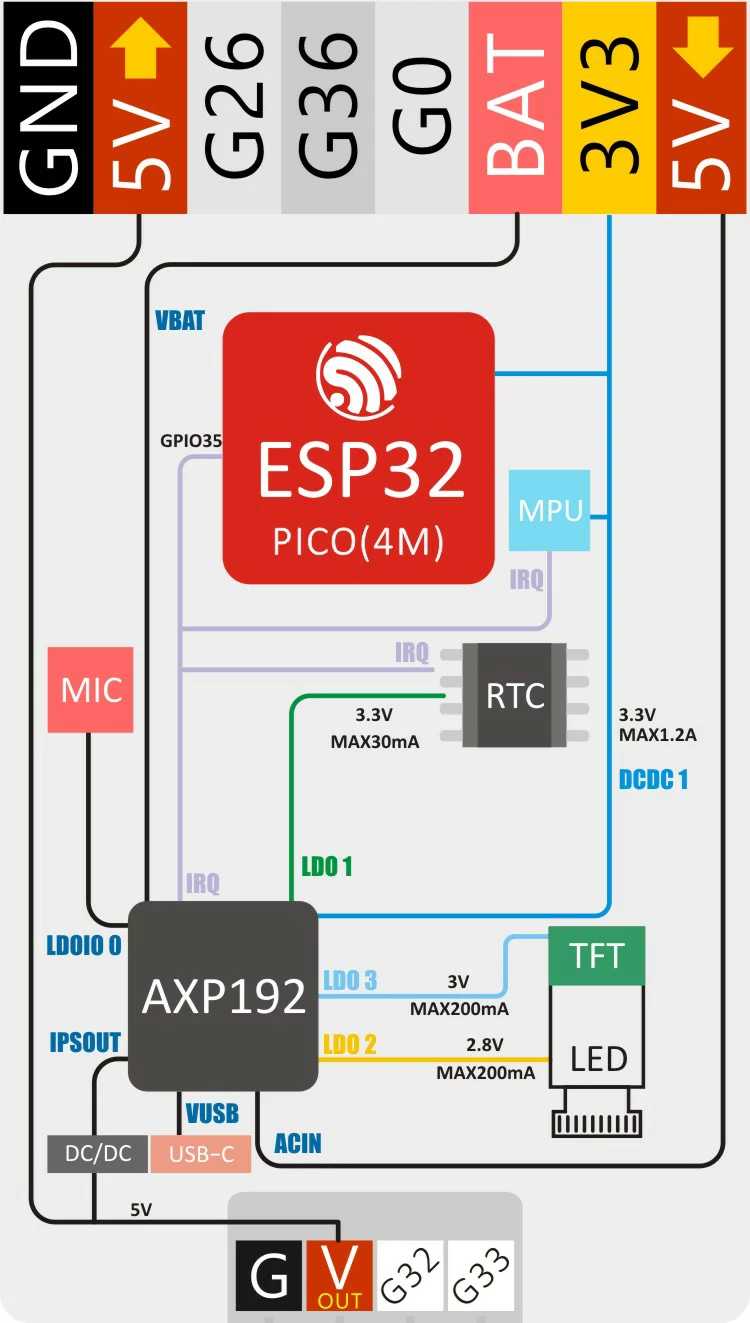
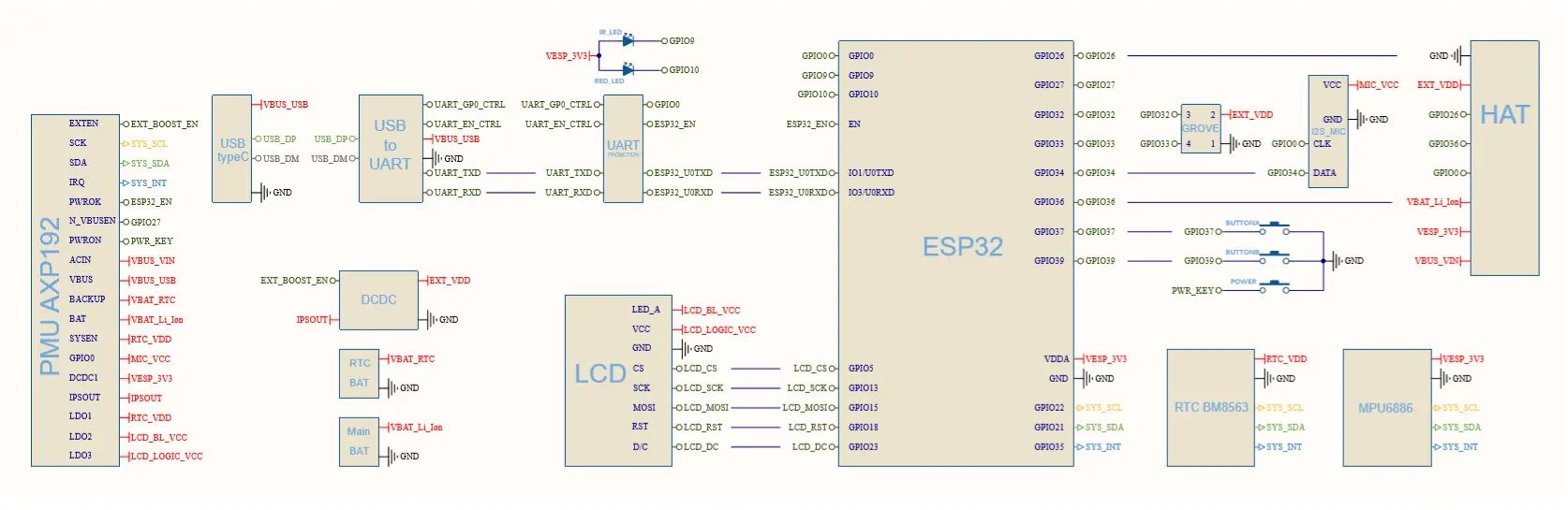
- PMU AXP192 (I2C+IRQ)
- 80 mAh Lipo Battery
- DC-DC converter (5V-Out Pin)
- GROVE PORT - 2nd I2C (SCL,SDA,GND,EXT_VDD) (GPIO32,GPIO33)
HY2.0-4P (aliexpress only) - HAT 8-pin connector
- GROVE PORT - 2nd I2C (SCL,SDA,GND,EXT_VDD) (GPIO32,GPIO33)
- Power control for other peripherals :
- 6-Axis IMU MPU6886 (I2C+IRQ, AXP-VESP_3V3)
- RTC BM8563 (I2C+IRQ, AXP-RTC_VDD)
- I2S MIC (GPIO0-SCK,GPIO34-DATA, AXP-MIC_VCC)
- LCD (0.96 inch) TFT 160x80 SPI (GPIO 5,13,15,18,23 + Backlight_LDO2 + Logic_LDO3)
- Red LED (GPIO10)
- IR transmitter (GPIO9)
- A-MAIN BUTTON (GPIO37)
- B-Side BUTTON (GPIO39)
PLATFORMIO :
- https://docs.platformio.org/en/latest/boards/espressif32/m5stick-c.html
- lib_deps = m5stack/M5StickC@^0.2.5
- platform = espressif32
- board = m5stick-c
- upload_protocol = esptool/espota
- upload_speed = 115200 ;MAXIMAL upload speed is 115200 !!!
ESP32-CAM
Links:
HW:
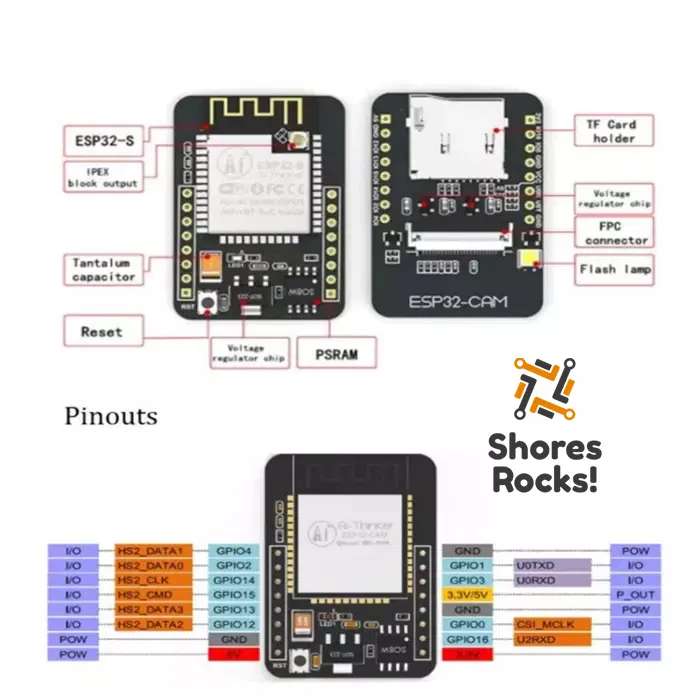
- ESP32-S
- BUILTIN_LED : none
- USB DRIVER : none
- Default TX Baud : 115200
- PSRAM size : 4.194.252 Bytes
PLATFORMIO :
- https://docs.platformio.org/en/latest/boards/espressif32/esp32cam.html
- platform = espressif32
- board = esp32cam
- framework = arduino
GCC
- -DARDUINO_ESP32_DEV
- -DBOARD_HAS_PSRAM
- -mfix-esp32-psram-cache-issue
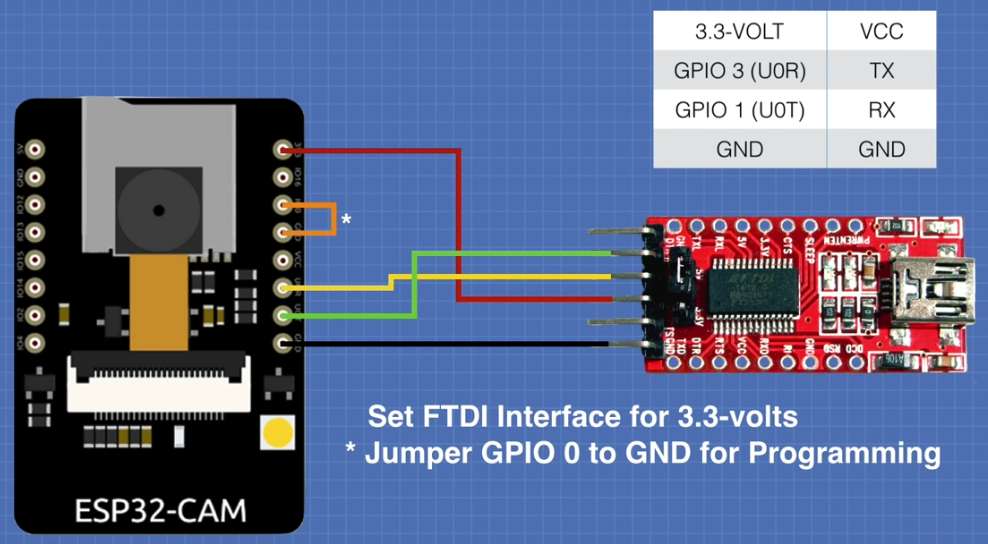
First time programmig sequence :
- connect USB-FTDI (see picture)
- set JUMBER (GND-IO0)
- press RST button ..
- See on COMx console :
waiting for download - programming ...
- See on COMx console :
- after programmed remove JUMBER and press RST again - OTA doesnot misteriously work
    -------------------------------------
    ESP-01 CH340    ESP32-CAM
    Programmer      PIN
    PIN
    -------------------------------------
    1 - GPIO3       GPIO3(U0RxD)
    2 - VCC         VCC
    3 -
    4 -
    5 -
    6 - RST                               (additional RESET BUTTON - active low)
    7 - GND         GND
    8 - GPIO1       GPIO1(U0TxD)
ESP32 - LILIGO T5 E-Ink display 2.13 inch
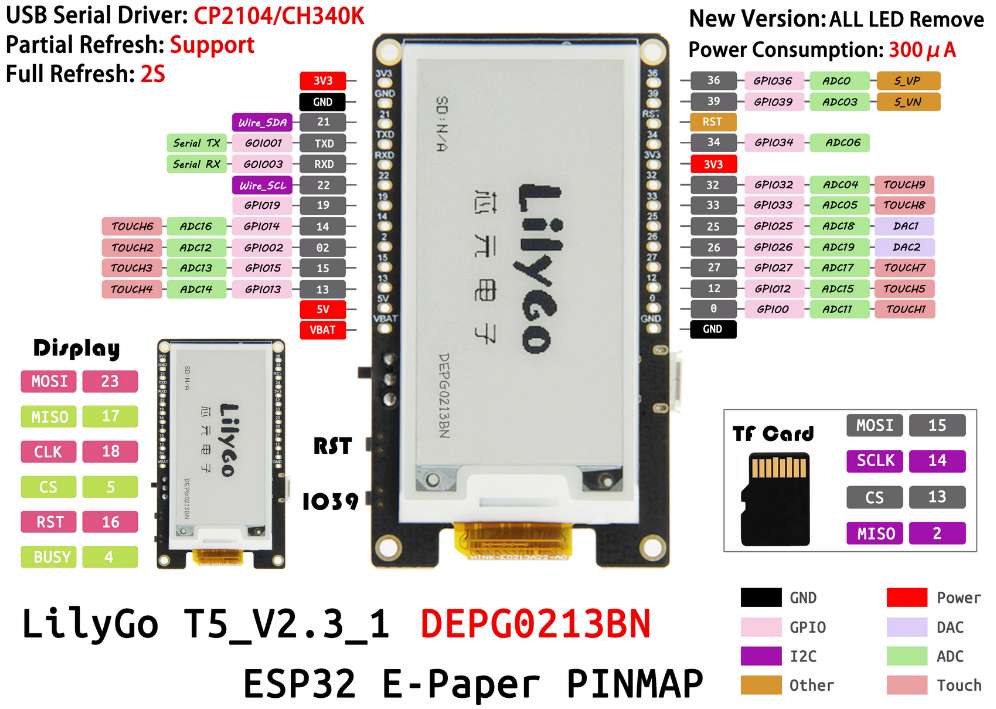


Buy:
- http://www.lilygo.cn/prod_view.aspx?TypeId=50061&Id=1393
- www.banggood.com
- https://www.laskakit.cz/lilygo-ttgo-t5-2-13--e-paper-esp32-wifi-modul/
Librares:
- https://github.com/Xinyuan-LilyGO/T5-Ink-Screen-Series ... includig LIBs (GxEPD + Adafruit GFX Library_ID13)
- https://github.com/lewisxhe/Esp-badge ... includig LIBs (GxEPD + Adafruit GFX Library_ID13)
- https://github.com/lewisxhe/GxEPD ... includig LIBs (GxEPD)
- https://github.com/bot1131357/GxEPD ... fork of "lewisxhe/GxEPD"
- YOUTUBE - Getting Started with the TTGO T5 E-Paper Display Development Board
- https://github.com/Xinyuan-LilyGO/LilyGo-T5-Epaper-Series ... T5 V2.3 - (no GxEPD libraries)
- https://github.com/Xinyuan-LilyGO/LilyGo-T5-ink-series .. (no GxEPD libraries)
- LILIGO_T5_EINK_V2.3.pdf ... schematics
Other/troubleshooting:
- https://docs.platformio.org/en/latest/boards/espressif32/mhetesp32minikit.html
- https://forum.arduino.cc/t/waveshare-e-paper-displays-with-spi/467865 .. exhaustive Q&A
- https://forum.arduino.cc/t/control-multiple-e-ink-display-with-a-single-arduino/488910
- E-paper hacking: fastest possible refresh rate - YOUTUBE(MsbiO8EAsGw)
HW:
- Power Cable(JST 2pin 1.25mm)
- Button : IO39 (inverted)
- LED_BUILTIN : none
- Serial : CH9102 .. default firmware 115200 Baud
- E-Ink Driver chip: DEPG0213BN 2.13" b/w 128x250 (DKE GROUP) - src
- Grey level: 2
- Full refresh time: 3.6 sec
- Partial update capable (1.3 sec)
PLATFORMIO :
- lib_deps = GxEPD; Adafruit_GFX_Library_ID13
- platform = espressif32
- board = mhetesp32devkit
Default firmware boot message
    ets Jul 29 2019 12:21:46

    rst:0x1 (POWERON_RESET),boot:0x17 (SPI_FAST_FLASH_BOOT)
    configsip: 0, SPIWP:0xee
    clk_drv:0x00,q_drv:0x00,d_drv:0x00,cs0_drv:0x00,hd_drv:0x00,wp_drv:0x00
    mode:DIO, clock div:2
    load:0x3fff0018,len:4
    load:0x3fff001c,len:1044
    load:0x40078000,len:10124
    load:0x40080400,len:5856
    entry 0x400806a8

    setup
    scan done
    2 networks found
    1: XXXXX 2.4GHz (-55)*
    2: YYYYY 2.4GHz (-73)*

    [E][sd_diskio.cpp:739] sdcard_mount(): f_mount failed 0x(3)
ESP32 - E-Paper Driver Board (ESP32-WROOM-32)
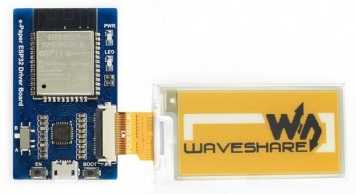
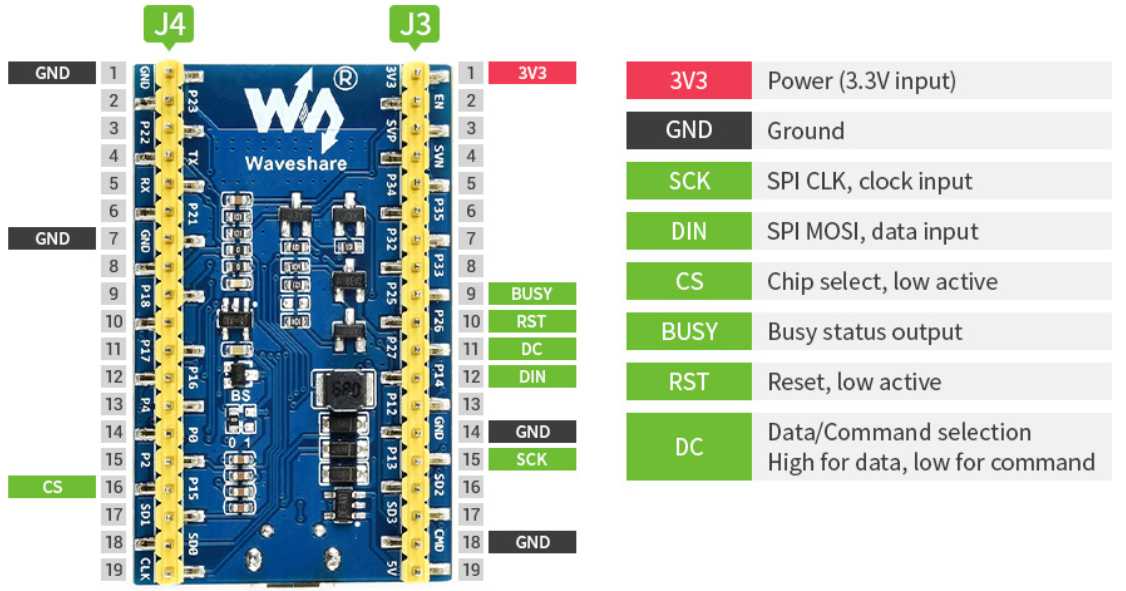
Links:
- https://rlx.sk/sk/esp32/6939-universal-e-paper-raw-panel-driver-board-esp32-wifi-bluetooth-wireless-ws-15823.html
- https://www.laskarduino.cz/waveshare-esp32-e-paper-raw-panel-driver-board/
HW:
- ESP32-WROOM-32 (38pin PCB-ANT)
- FLASH : 4MB
- BUILTIN_LED (red) = GPIO2 [D4] / (IO2-ModulePin24) / (P2-BoardPin)
- USB DRIVER : CP210x
PLATFORMIO :
- https://docs.platformio.org/en/latest/boards/espressif32/esp32dev.html .. (from LASKAARDUAINO.CZ : Deska je kompatibilní s Arduino IDE a s NodeMCU)
- platform = espressif32
- board = esp32dev (Espressif ESP32 Dev Module)
- upload_protocol = esptool (Default)
- lib_deps =
- bodmer/TFT_eSPI@^2.3.70 .. nefunguje zatial
- zinggjm/GxEPD2@^1.3.4
- GxEPD2 : Waveshare 2.9 b/w : #define GxEPD2_DISPLAY_CLASS GxEPD2_BW
- GxEPD2 : Waveshare 2.9 b/w : #define GxEPD2_DRIVER_CLASS GxEPD2_290_T94_V2
- GxEPD2 : Waveshare 2.9 b/w/r : #define GxEPD2_DISPLAY_CLASS GxEPD2_3C
- GxEPD2 : Waveshare 2.9 b/w/r : #define GxEPD2_DRIVER_CLASS GDEW029Z10
WAVESHARE :
- forum.arduino.cc : Waveshare e-paper displays with SPI
- E-Paper_ESP32_Driver_Board
- E-Paper_ESP32_Driver_Board_user_manual_en.pdf
- E-Paper_ESP32_Driver_Board_Code.7z .. LIB tuto som pouzil
- E-Paper_ESP32_Driver_Board_Schematic.pdf
- OTHER : 2.9inch_e-Paper_Module_code.7z .. zatial neviem co to je
- E-Ink display 296x128, 2.9inch raw e-Paper panel (WS-12563) SPI, without PCB
- https://rlx.sk/sk/e-paper-e-ink/6466-e-ink-display-296x128-29inch-raw-e-paper-panel-ws-12563-spi-without-pcb.html
- https://www.e-paper-display.com/products_list/pmcId%3d29.html
- https://github.com/waveshare/e-Paper
- https://www.waveshare.com/wiki/2.9inch_e-Paper_Module
- ARDUINO : E-Paper_ESP32_Driver_Board_Code.7z >> esp32-waveshare-epd >> examples >> epd2in9_V2-demo
- E-Ink display 296x128, 2.9inch raw e-Paper panel, three-color (WS-13276)
- https://rlx.sk/sk/e-paper-e-ink/6473-e-ink-display-296x128-29inch-raw-e-paper-panel-three-color-ws-13276.html
- https://www.waveshare.com/wiki/2.9inch_e-Paper_Module_
- https://www.waveshare.com/w/upload/b/bb/2.9inch-e-paper-b-specification.pdf
- https://www.e-paper-display.com/products_list/pmcId%3d27.html
- https://github.com/waveshare/e-Paper
- ARDUINO : E-Paper_ESP32_Driver_Board_Code.7z >> esp32-waveshare-epd >> examples >> epd2in9b_V3-demo
| Part Number | Colors | Grey Scale | Resolution | Full Refresh (s) | Partial Refr.[1] | PI Head.[2] | Flexi. | Interface | Slavo Note |
| 2.9inch e-Paper Module | black, white | 2 | 296×128 | 2 | YES | SPI | SWITCH=B; epd2in9_V2-demo; (epd2in9-demo) | ||
| 2.9inch e-Paper Module (B) | red, black, white | 2 | 296×128 | 15 | SPI | SWITCH=A; epd2in9b_V3-demo; (epd2in9bc-demo); | |||
| 2.9inch e-Paper Module (C) | yellow, black, white | 2 | 296×128 | 15 | SPI | ||||
| 2.9inch e-Paper HAT (D) | black, white | 2 | 296×128 | 2 | YES | YES | YES | SPI | |
| 2.9inch Touch e-Paper HAT | black, white | 2 | 296×128 | 2 | YES | YES | SPI |
- [1] It usually takes about 0.3s for partial refresh[2] Pi Header: standard Raspberry Pi 40PIN GPIO extension header, supports Raspberry Pi series boards
ESP32 - WEMOS WiFi Blue-tooth Battery, ESP32, ESP-WROOM-32
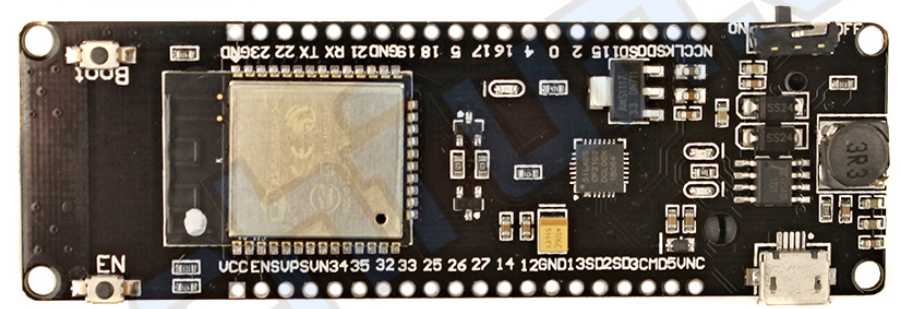
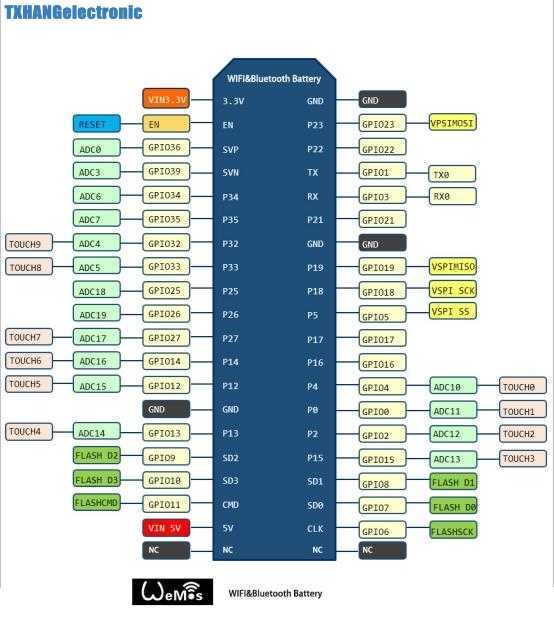
Aliases :
- WeMos WiFi and Bluetooth Battery
Links:
- https://techfun.sk/produkt/wemos-esp32-wifi-bluetooth-s-bateriou/
- https://www.aliexpress.com/item/32850260228.html
- https://www.alibaba.com/product-detail/WEMOS-WiFi-Blue-tooth-Battery-ESP32_60795452864.html
HW:
- ESP32-D0WDQ6 (revision 1)
- ESP-WROOM-32
- FLASH : 4MB
- BUILTIN_LED = GPIO16 [D0]
- Cannot be reset by serial port (Hold both the BOOT and EN, then release EN)
- Default Boot Messages Speed 115200
PLATFORMIO :
- https://docs.platformio.org/en/latest/boards/espressif32/wemosbat.html
- platform = espressif32
- board = wemosbat
ESP8266 Boards
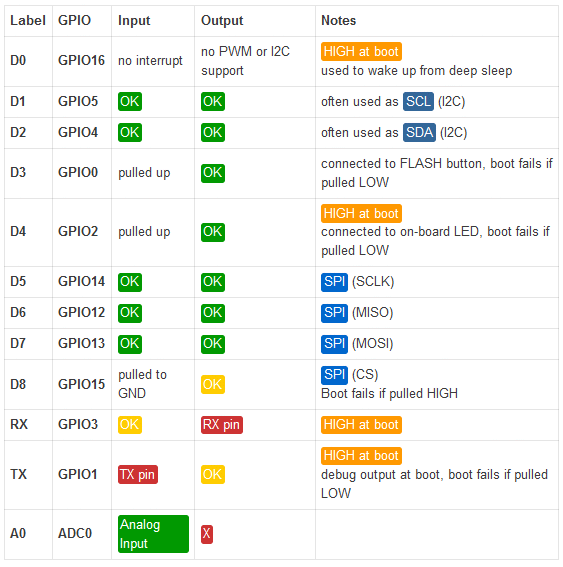
Links
- https://www.esp8266.com/wiki/doku.php?id=esp8266-module-family
- https://nurdspace.nl/ESP8266
- ESP8266 Datasheet
- https://thingspeak.com/ .. IOT
ESP8266 - ESP-01S Wifi Module (AI Cloud Inside)
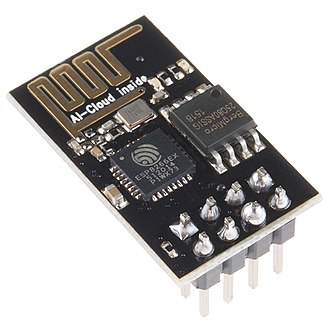
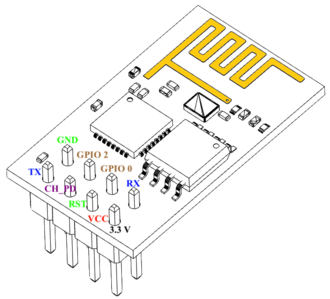
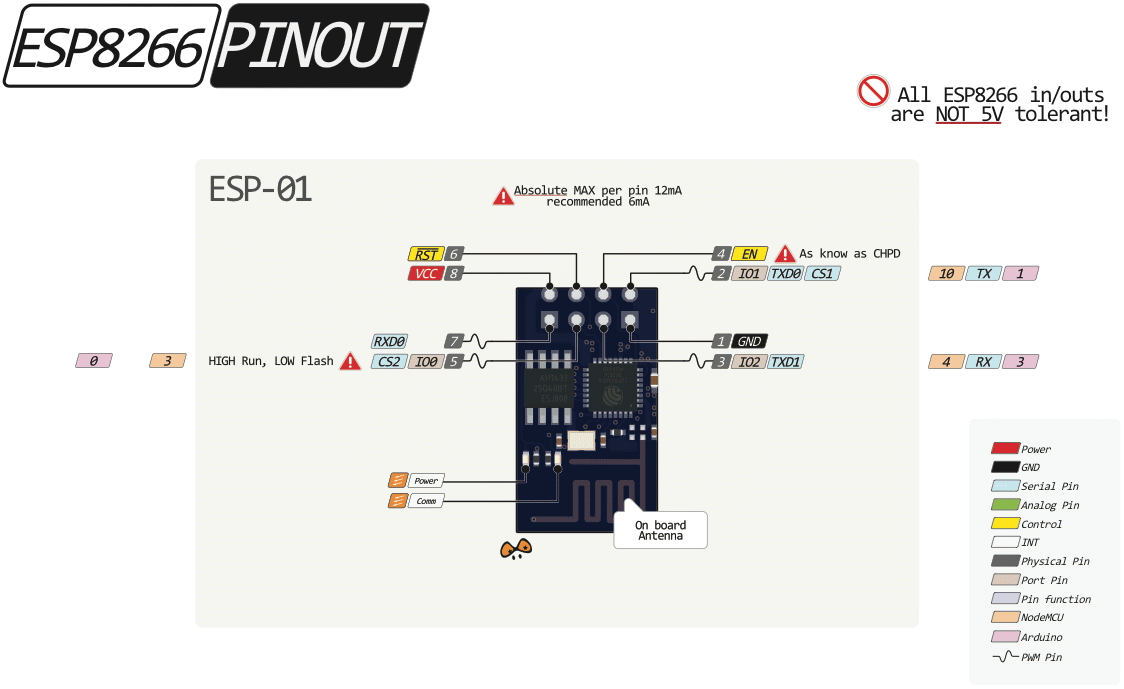
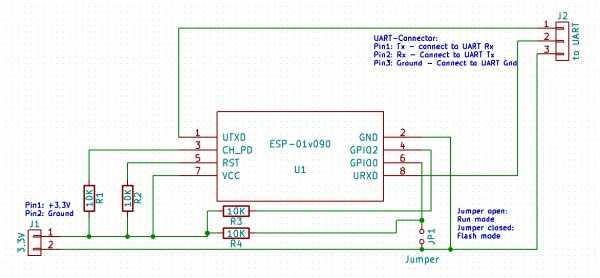
Aliases :
- ESP-01, ESP-01S, AI Cloud Inside, Ai-Thinker
Links:
- https://techfun.sk/produkt/wifi-modul-esp8266/
- https://www.laskarduino.cz/ai-thinker-esp-01-esp8266-wifi-modul/
- https://www.laskarduino.cz/ai-thinker-esp-01s-esp8266-wifi-modul/
TROUBLESHOOTING
- https://www.instructables.com/USB-to-ESP-01-Board-Adapter-Modification/
- ESP 8266 timed out waiting for packet header
- https://randomnerdtutorials.com/solved-failed-to-connect-to-esp32-timed-out-waiting-for-packet-header/
- Yotube - ESP-01 UART and turning it to a programmer
Upgrading FLASH Chip
- ESP8266EX uses external SPI flash to store user programs, and supports up to 16 MB memory capacity theoretically.
The minimum flash memory of ESP8266EX is shown below :
- OTA disabled: 512 kB at least
- OTA enabled: 1 MB at least
According to data sheets the ESP8266 can address up to 16Mbytes of flash (128Mbits)
So chips up to 128 Mbits (16Mbytes) should work OK.
If you go higher than that they may appear to work but you would need to check the memory space isn't being aliased (wrapped around) as the data sheet would imply. - YouTube - Andreas Speies - #34 ESP-01/ESP-07 4Mbyte Memory Upgrade and OTA
- https://www.youtube.com/watch?v=IWe-JRrS7Lo
- FLASH Chips :
- W25Q40BV .. Winbond 4Mb QSPI (512KB)
- W25Q32BV .. Winbond 32Mb QSPI (4MB)
- 25Q80ASIG (25VQ80ASIG) .. 8Mb (1MB) - Winbond pin compatible
- W25Q32FVSIG/W25Q64FVSIG/W25Q128FVSIG (4MB/8MB/16MB) - Techfun - up to 2.80 Eur
- W25Q128FVSIG .. 128Mb (16MB) QPI - RLX module 6.5E
HW ESP-01S :
- 5V INTOLERANT !
- 1 MB FLASH
- 1xLED : Blue LED (low=on) - shared with heder pin GPIO2 (GP2)
- GPIO 0 - Grounded by jumper ==> programming mode
- GPIO 2 - usable by code (but shared with LED)
- GPIO 1 = TX (usable when Serial Disabled)
- GPIO 3 = RX (usable when Serial Disabled)
HW ESP-01 :
- 5V INTOLERANT !
- 512 KB FLASH
- 2xLED : Blue LED on TX + Red Power LED
PLATFORMIO :
- https://docs.platformio.org/en/latest/boards/espressif8266/esp01.html
- env:ESP8266_ESP_01S
- platform = espressif8266
- board = esp01 OR esp01_1m
- upload_port = COM6 (pozor pri power on drzat stlaceny napalovaci button)
ESP8266 ESP-01S SHIELD - NeoPixel
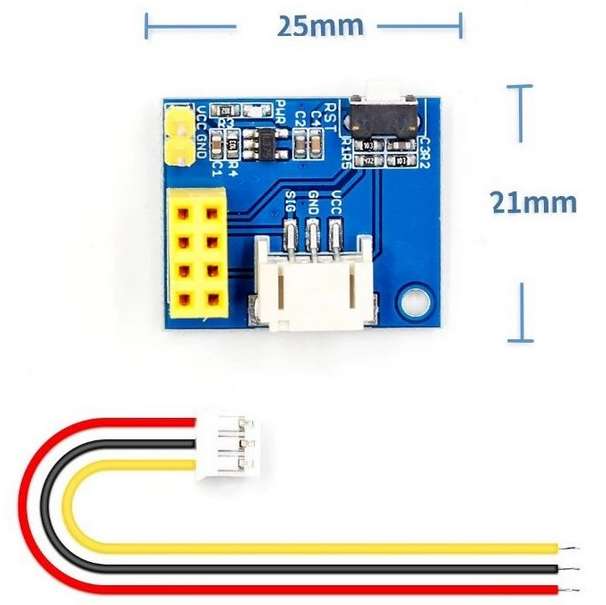
Libraries:
- Adafruit NeoPixel - https://github.com/adafruit/Adafruit_NeoPixel - Adafruit_NeoPixel.h
Specification:
- Obsahuje JST-PH konektor s kablíkem pro připojeni NeoPixel LEDek a displejů.
- Pracovní napětí: DC 3.7V - 9V (Pozor VCC přimo napojen na VCC NeoPixel )
- ESP8266: ESP-01, ESP-01S
ESP8266 ESP-01S SHIELD - Relé shield
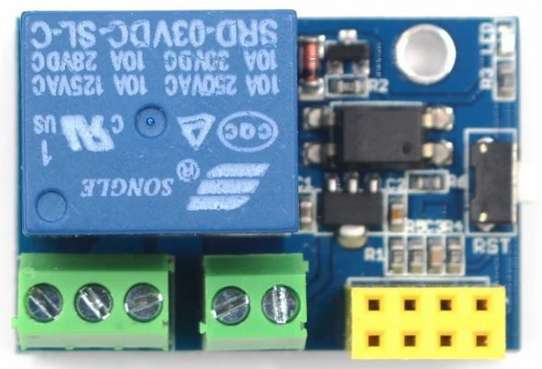
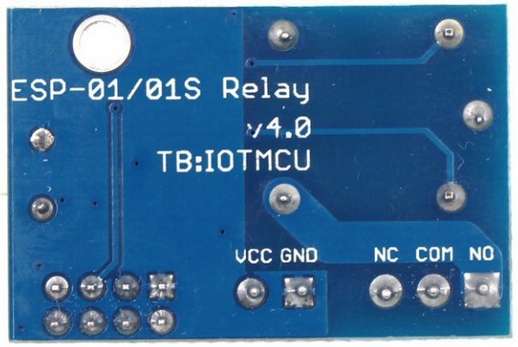
Libraries:
Specification:
- Pracovní napětí : 5-12V - stabilized
- Relé : Songle SRD-05VDC-SL-C : AC250V 10A / DC30V 10A
- Trigger : GPIO0 Low Level
ESP8266 - ESP-201
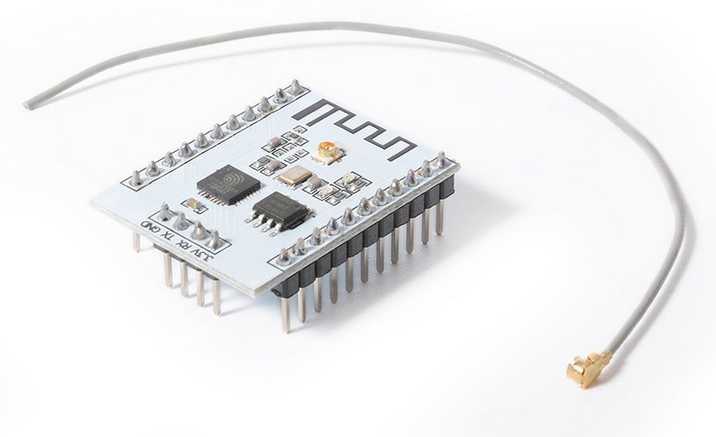
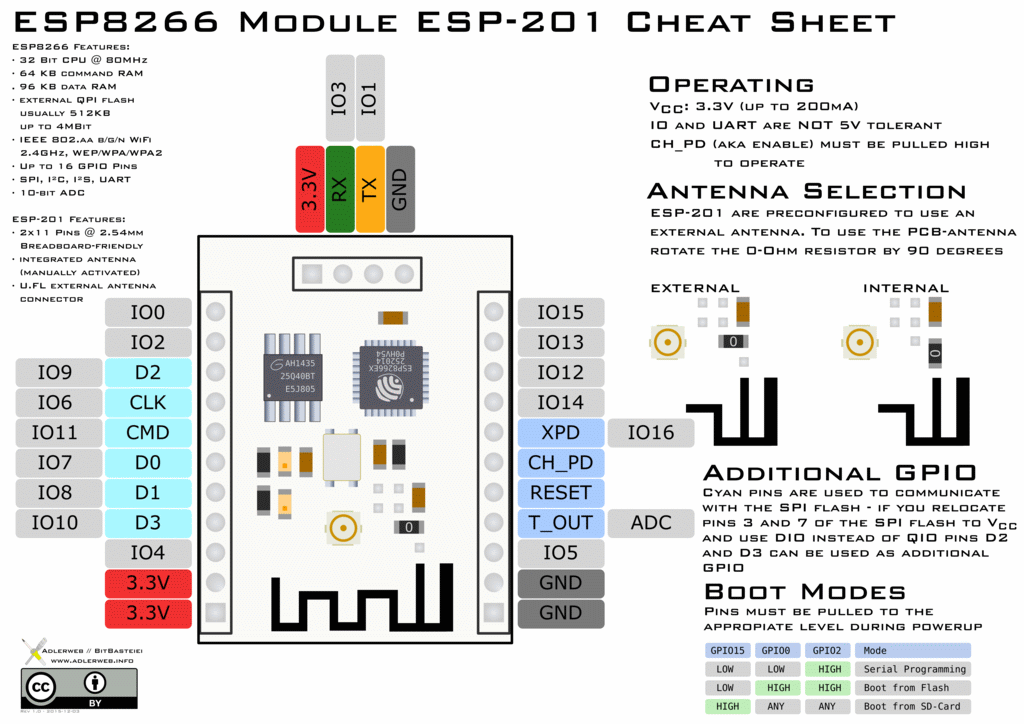
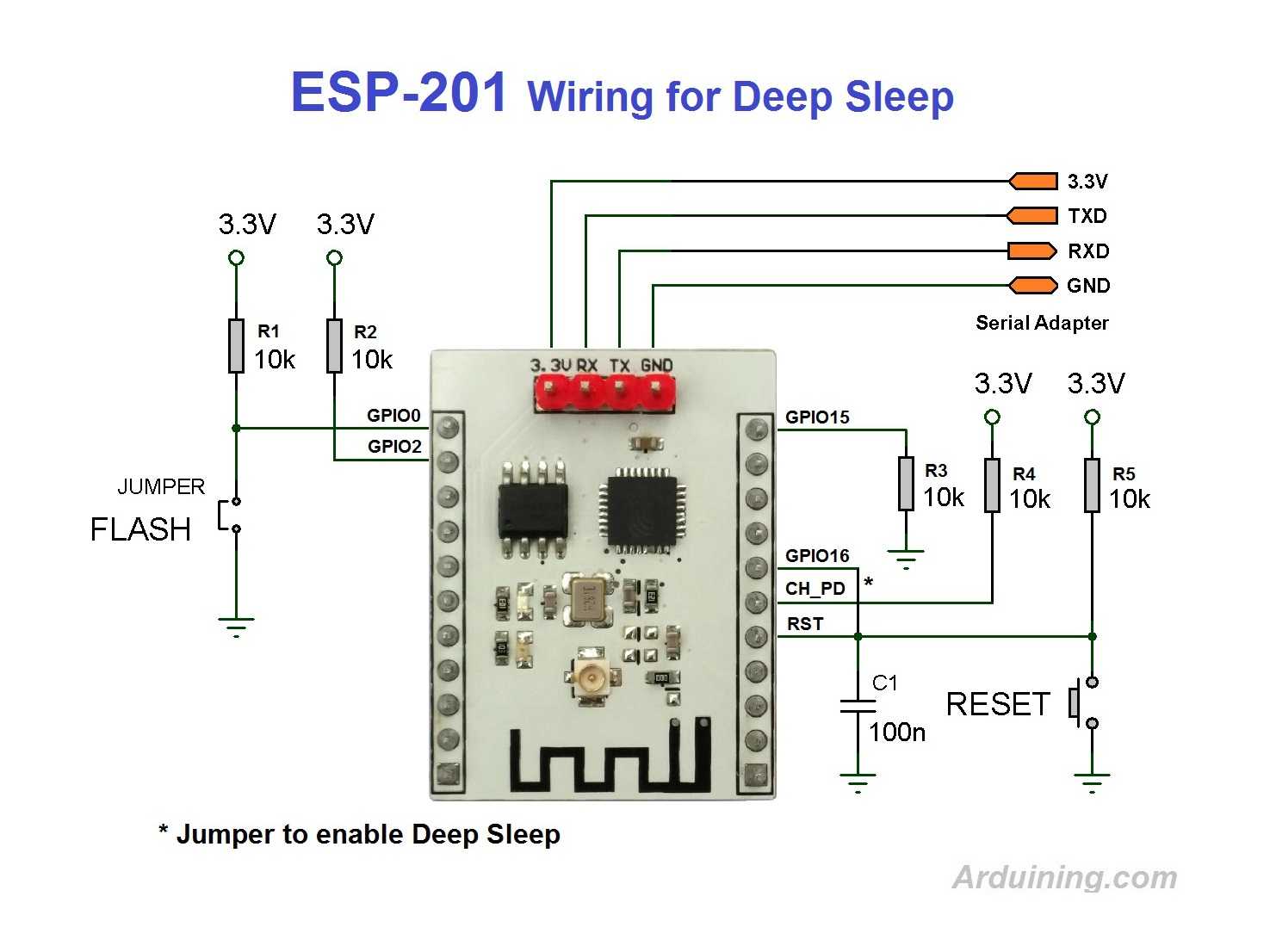
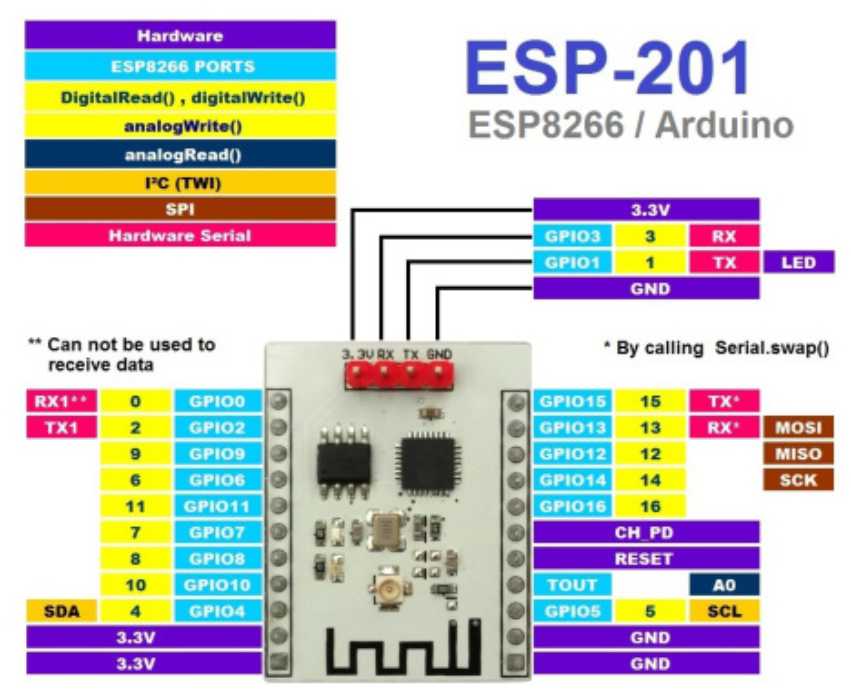
Links:
- https://www.gme.sk/esp-201
- Programming an ESP-201 WiFi Module Using the Arduino IDE
- Youtube - ESP8266 Memory Upgrade, 512K to 4MB for less than a dollar.
HW:
- 5112 KB FLASH
- Blue LED = GPIO1 = TX ==> thus must not be used as blink LED
- Red LED = POWER
- Boot messages at 76800 Baud rate :
- "rst cause:2" ... is #RST pin .. see here
- "boot mode:(7,7)" ...
- "boot mode:(5,7)" ..
PLATFORMIO :
- https://docs.platformio.org/en/latest/boards/espressif8266/esp01.html
- platform = espressif8266
- board = esp01 OR esp01_1m
ESP8266 - Wemos NodeMCU V3, ESP8266, 32M Flash Extra Memory, CH340G
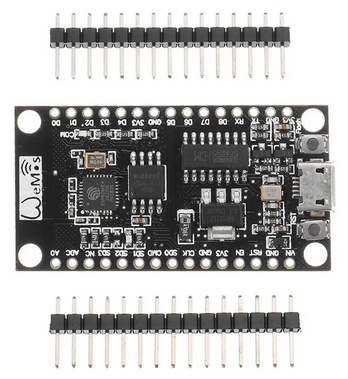
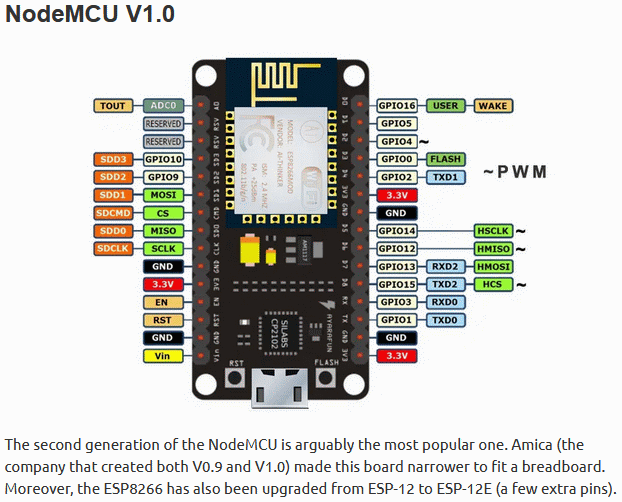
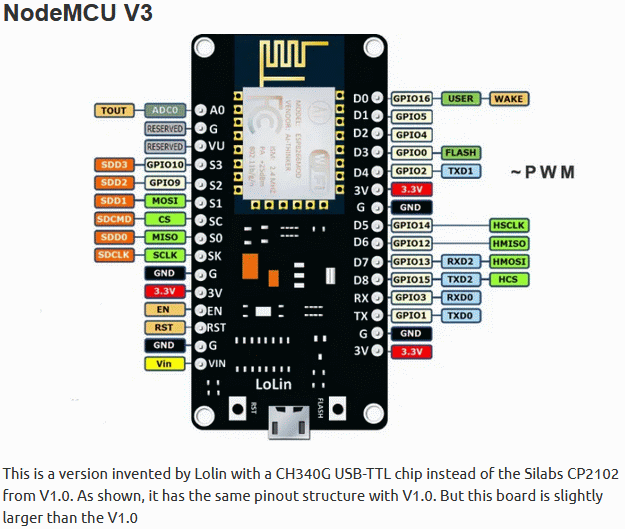
Aliases :
- NODE MCU ESP12-E v3.0 CH340G
Links:
- https://techfun.sk/produkt/wifi-modul-esp8266-32m-pamat/
- https://www.banggood.com/sk/3Pcs-Wemos-NodeMCU-V3-340G-Lua-WIFI-Module-Integration-Of-ESP8266-Extra-Memory-32M-Flash-p-1253572.html
- https://www.teachmemicro.com/nodemcu-pinout/
HW:
- BUILTIN_LED = GPIO16 (blue inverted)
- USB DRIVER : CH340
- FLASH : 32Mbit / 4MB .. BoyaMicro 25Q32
- Boot Loader Messages baud : 76800
PLATFORMIO :
- https://docs.platformio.org/en/latest/boards/espressif8266/nodemcuv2.html
- env:ESP8266_NODEMCU_32M_FLASH
- platform = espressif8266
- board = nodemcuv2
- upload_protocol = esptool; (default)
- upload_port = COM10
ESP8266 - HW-630, NODEMCU, with 0.96" OLED
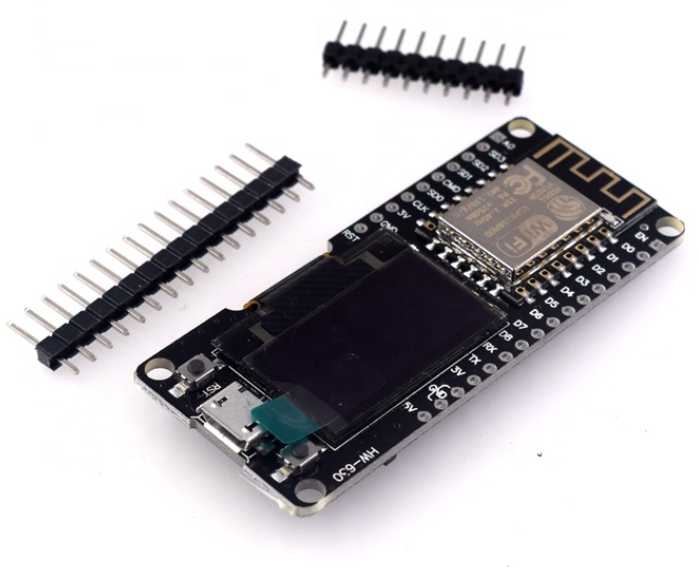
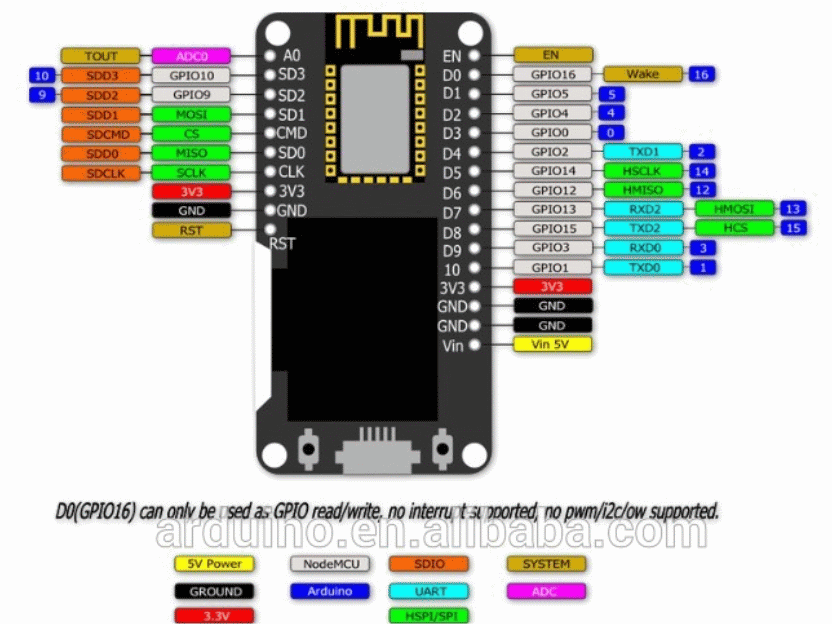
Aliases:
- ESP12-F
- NodeMCU 1.0 (ESP-12E Module)
Links:
- https://techfun.sk/produkt/vyvojova-doska-esp12-f-0-96-oled-display/
- https://www.alibaba.com/product-detail/HW-630-New-NODEMCU-WIFI-ESP8266_1600073238433.html
- https://www.banggood.com/sk/Nodemcu-Wifi-And-NodeMCU-ESP8266-0_96-Inch-OLED-Module-Development-Board-p-1154759.html
- Please note that de pins of the I2C controller of the display are swapped compared to the default setting of the ESP Easy firmware.
At least the pins are printed on the PCB.
I2C address is 0x3c (default for these displays)
- Please note that de pins of the I2C controller of the display are swapped compared to the default setting of the ESP Easy firmware.
- AT commands
- https://nurdspace.nl/ESP8266
OLED Libraries
- https://github.com/ThingPulse/esp8266-oled-ssd1306 .. this OLED library works !!!
- ESP8266 and ESP32 OLED driver for SSD1306 displays
HW:
- BUILTIN_LED = GPIO2 (blue inverted) - shared with TXD1 !
- USB DRIVER : CP210x
- I2C OLED display: 0.96″, 128 x 64
PLATFORMIO :
- https://docs.platformio.org/en/latest/boards/espressif8266/nodemcuv2.html
- platform = espressif8266
- board = nodemcuv2
- upload_protocol = esptool ;(default) - hold FLASH buton on powerup to upload
NRF24L01
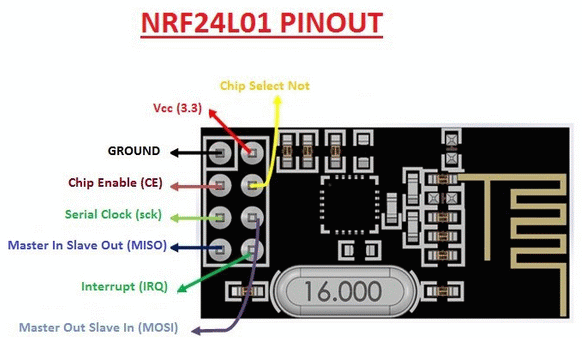
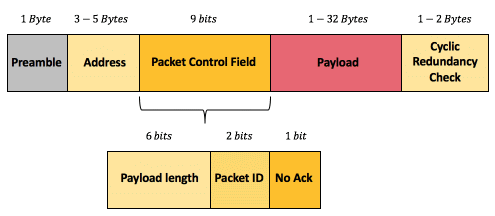
- supply voltage 3.0-3.6V
- The data (CE/CSN/MOSI/MISO/SCK) pins are 5V tolerant
- Fixing Connection Issues : Solder a 10 uF electrolytic capacitor to pins 1 (GND) and 2 (PWR) of the module
- default channel for the RF24 library is : 76 => 2476 Mhz (RF24 channel 77) ==> ie. WiFi channel 13 - 2.472 GHz - (2.461 - 2.483 GHz)
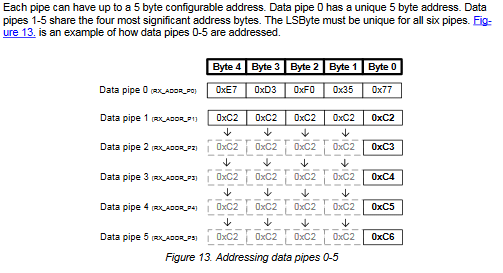
- ADDRESS : avoid using 0x55(U) & 0xAA(Ş) characters in Adddess (collision with Preamble causing sync problems and high packet-lost-rate)
- "1Node" "2Node" "3Node" work,
- "Node1" "Node2" "Node3" don't.
- PIPE 0 usually is WRITE only pipe
- PIPE 1-5 usually is READ pipes
- The 6 pipes allow an nRF24 to listen for messages from 6 other devices with 6 different addresses. But those devices may not transmit at the exact same time.
- Opening only pipe 2 to 5 listens on an unexpected address. (Prefix 0xC2C2C2C2)
- There are two modes of operation
- {A} a fixed payload size which defaults to 32 bytes and can be changed with setPayloadSize() and
- {B} a dynamic payload mode which is chosen with enableDynamicPayloads().
The dynamic payload mode is automatically applied when you choose the ackPayload feature. You can check the payload size with getDynamicPayloadSize().
When using dynamic payloads you must ensure that you read all the bytes that are received or the communication will break down.
- ACK
- The only situation where you can't use ACK is when the Master sends a message that is picked up by several slaves listening on the same address.
- In another scenario if the master is listening for messages from slaves the slaves can all call the master on the same address (one at a time, of course) and in that case the master can acknowledge each message.
Simple one way transmission
- The following pair of programs sends a simple message “Message N” from the TX to the RX where N is a number that increments from 0 to 9 so that you can see that successive messages are sent and received.
- See : SimpleTx.ino + SimpleRx.ino
Two-way transmission using the ackPayload concept
- The complications of swapping roles can be completely avoided by using the ackPayload concept.
The idea is that the slave puts data in the ackPayload buffer BEFORE it receives a message from the master
and then the data in the ackPayload buffer is sent automatically as part of the normal acknowledgment process without your code needing to make the devices swap roles.
See : SimpleTxAckPayload.ino + SimpleRxAckPayload.ino - AUTOACK payLoad
- MA writingPipe[P0,"Adr01"] ==> MA noneReadingPipe ==> AUTOACK payLoad delivered (ex. last known sensor reading)
- MA writingPipe[P0,"Adr02"] ==> MA noneReadingPipe ==> AUTOACK payLoad delivered (ex. last known sensor reading)
- ...
- MA writingPipe[P0,"Adr99"] ==> MA noneReadingPipe ==> AUTOACK payLoad delivered (ex. last known sensor reading)
Two-way transmission by swapping roles
Related articles
- arduinoetal.net - nRF24 Software
- https://nrf24.github.io/RF24/index.html
- Simple nRF24L01+ 2.4GHz transceiver demo .. referenced from nRF24l01 one master 10+ slaves two way communication
PCF8574
- https://techfun.sk/produkt/i2c-zbernica-pre-lcd-display/
- https://github.com/fdebrabander/Arduino-LiquidCrystal-I2C-library
Libraries:
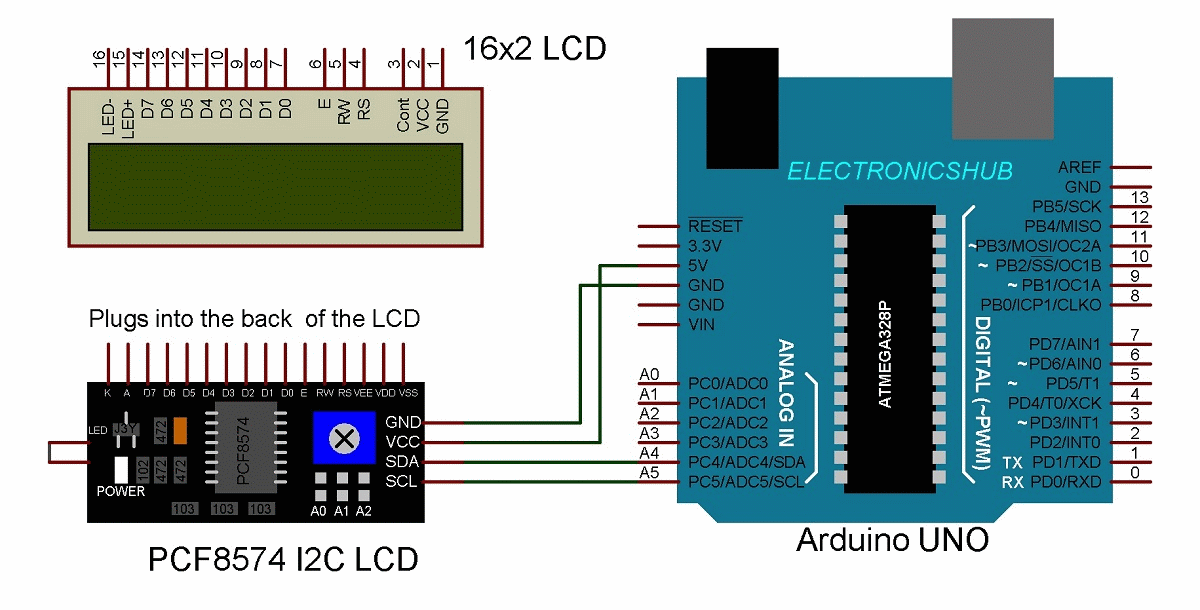
- LiquidCrystal_PCF8574.h .. Hitachi HD44780 chip that is connected through a PCF8574 I2C adapter.
- LiquidCrystal_I2C.h .. 1602A chip that is connected through a PCF8574 I2C adapter.
Specification:
- Compatible for 1602 LCD
- Supply voltage: 5V
- I2C Address: 0X20~0X27 (the original address is 0X20,you can change it yourself)
- the backlight and contrast is adjusted by potentiometer
- I2C Address: 0x27 (I2C Address: 0X20~0X27 (the original address is 0X27,you can change it yourself)
SPI FLASH chips
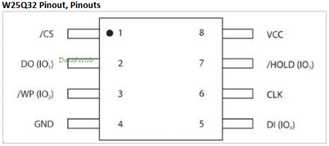
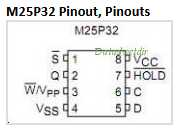
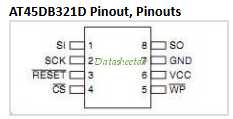
Suitable upgrade FLASH replacements in ESP boards
- W25Q80xxx by Winbond (8 Mbit / 1 MB) - minimal for OTA (GME.sk)
- W25Q16xxx by Winbond (16 Mbit / 2 MB)
- W25Q32xxx by Winbond (32 Mbit / 4 MB)
- W25Q64xxx by Winbond (64 Mbit / 8 MB)
- W25Q128xxx by Winbond (128 Mbit / 16 MB) - is ESP maximum
- M25P32xxx by Micron (32 Mbit / 4 MB) - (GME.sk)
Links :
VK-4002 (WK 4002) : LCD display
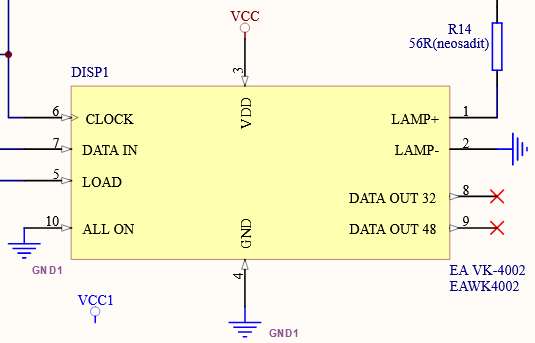
- 1 - LAMP+ : VCC via resistor - n/c
- 2 - LAMP- : GND - n/c
- 3 - VCC
- 4 - GND
- 5 - LOAD : GPIOx (high pulse) - rising edge latches ?
- 6 - NOT_CLK : GPIOx (low pulse) - falling edge latches ?
- 7 - DATA_IN : GPIOx
- 8 - DATA_OUT_32 : n/c
- 9 - DATA_OUT_48 : n/c
- 10 - ALL_ON : connect to GND
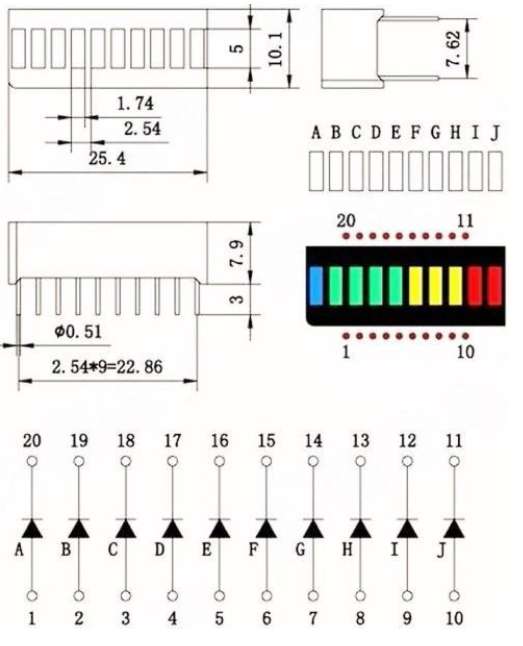
LED bargraph
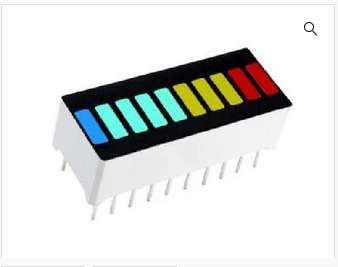
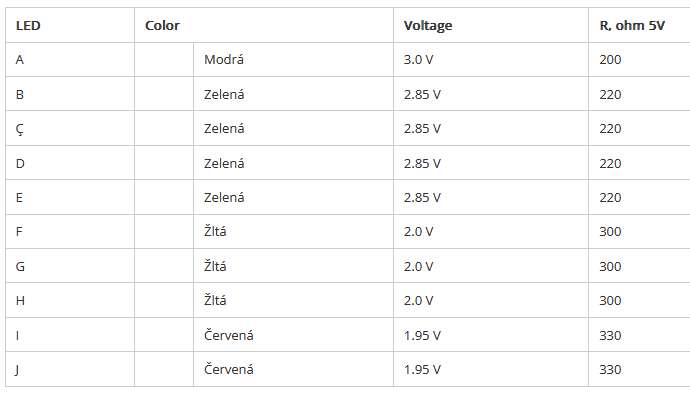
Links: